My friend has a locked computer that the password doesn’t work (maybe they tried too many times)
And now the computer is asking for a PIN code
Does anyone know what this is, and what to do?
Thanks
Windows 11 LG
My friend has a locked computer that the password doesn’t work (maybe they tried too many times)
And now the computer is asking for a PIN code
Does anyone know what this is, and what to do?
Thanks
Windows 11 LG
If he has Microsoft account he should log in there and reset the password.
A PIN is just a number password. Only numbers, no symbols or words
He doesn’t know what a Microsoft account is. 
my windows 11 pin has letters and symbols, and it still called a pin by windows, so i wouldn’t be sure it necessarily means just numbers
You can select when creating the pin, that it should includeetters and characters.
@The-curious assuming that there are no other admin users, and reset password does not work. Then lookup pcunlocker, https://www.pcunlocker.com/.
It is very straightforward.
That’s if you want super easy, if you want free you can try something like Hiren’s boot CD https://www.hirensbootcd.org also not too hard, except there’s a lot more than password removal on there.
As far as I know, password removal only works on local accounts, but I might be wrong.
You could however make a local admin account.
Yes, but once you make a local admin account you can get in to wherever you need
Yep
I like chntpw, haven’t used it in a while though.
@The-curious What ended up happening with your friends computer? Were you able to get in?
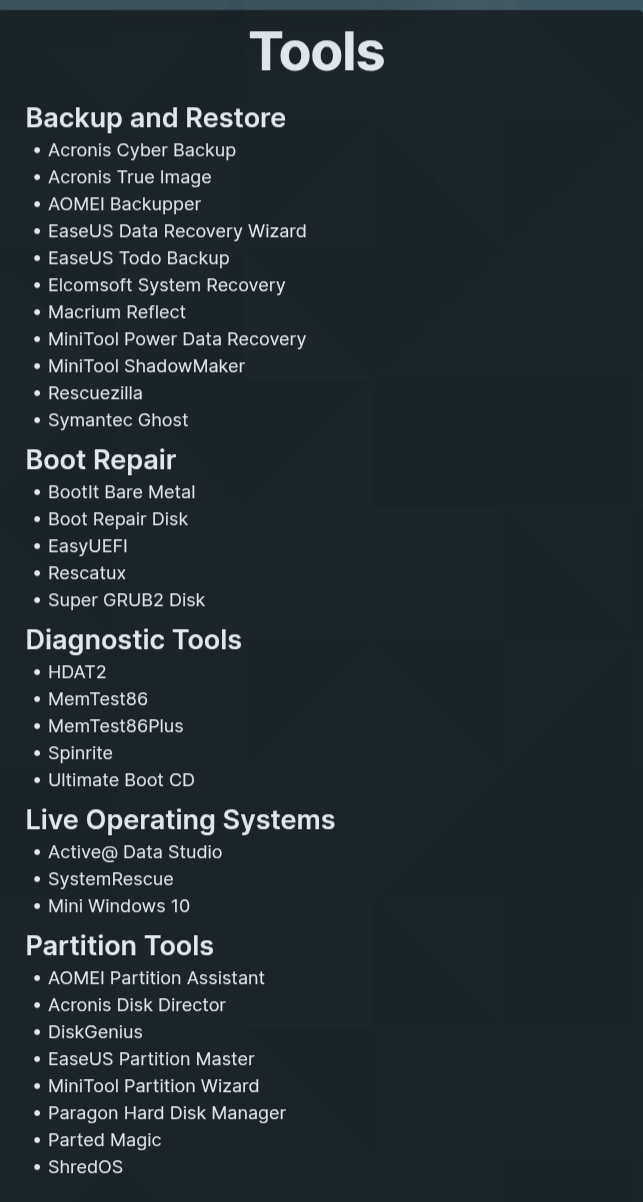
I set up a USB with Ventoy, that has Medicat installed on it that has around 20gb of tools that can troubleshoot computers and much more. I also have on the USB Hiren’s Boot CD, and Windows 10 SO’s and Windows 11 ISO’s.
It is much more useful than having multiple USB’s. I am not sure why I am writing this, but you mentioned HBCD, so I thought that Ventoy and Medicat is worth a mention.
The next day I tried to log in with the regular password and it worked
And when I logged in to the email that is linked to his Microsoft account
There were a lot of emails about attempted computer hacking and Microsoft stopped it
Very interesting
Medicat is great
Medicat also runs through Ventoy, so you can have a separate folder with ISO’s and IRST (Intel Rapid Storage Technology) drivers if doing a new install or reinstall.
This tool ooks really cool!
Can someone please explain what it does/has exactly?
Normally I would shoot and ask questions later but it is a 20 GB download.
Yes, Ventoy is great for multiboot, I couldn’t believe it was legit when I first saw it, because every other multiboot solution was so complicated with many limitations. Medicat is based off Ventoy just comes with many Iso’s on it, and you can add your own since its really Ventoy.
Only issue with Ventoy is secure boot issues, even though you could register a certificate, it’s easier to disable secure boot first. I have a separate hirens boot cd if I know that’s all I need, then I don’t need to play with secure boot.