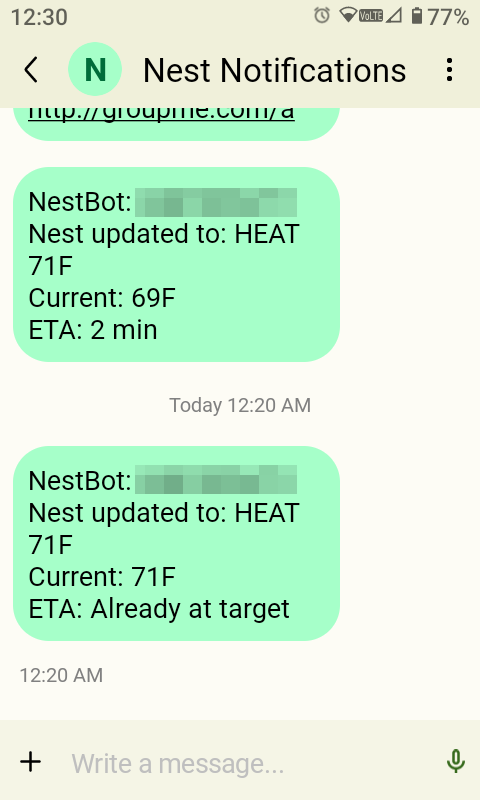
I’ve been trying to find ways to bring useful tools over to the Wonder phone. I am now B"H able to change my Nest thermostat temperature via a text message!
Please note that this was a complex setup (at least for me), and I’ve tried to document it as accurately as possible, but some steps might need tweaking. If you run into trouble, feel free to ask ChatGPT for help or consult your favorite developer.
This setup is configured for one Nest device but can be customized to control multiple devices.
Overview
This setup allows you to:
- Send an SMS to a Google Voice number.
- Google Voice forwards the SMS to Gmail.
- Google Apps Script reads Gmail, parses the temperature command, and:
- Updates your Nest thermostat via Google Smart Device Management (SDM) API.
- Posts a confirmation message to a GroupMe group via a bot.
Workflow Diagram:
Your Phone → Google Voice SMS → Gmail → Google Apps Script
                    └──────────────→ Nest SDM API (Set Temperature)
                    └──────────────→ GroupMe Bot (Confirmation)
Safety & Security
 No public endpoints used.
- Only authorized phone numbers can control the thermostat.
- Rate limiting prevents abuse (one command per minute per number).
- Gmail label prevents duplicate processing.
- Sensitive information is stored in Apps Script constants; no private keys are hardcoded.
Step 1: Google Voice SMS (5 minutes)
Purpose: Get SMS into Gmail for free.
-
Go to voice.google.com → Get a Google Voice number (free US number).
-
Settings → Messages → Forward messages to email → Enable for your Gmail.
-
Test: Text
72to your new Google Voice number. -
Verify: Check Gmail – you should see an email like:
From: voice-noreply@google.com
Subject: New SMS
Body: +1-555-123-4567: 72
Copy the exact “From” address for Step 4.
Step 2: GroupMe Bot (3 minutes)
Purpose: Post confirmations to your GroupMe group.
- Create GroupMe group:
Nest Control(add yourself + others). - Go to dev.groupme.com → Bots → Create Bot:
- Group: Select
Nest Control - Bot name:
NestBot - Callback URL: Leave blank
- Group: Select
- Save → Copy
BOT_ID(e.g.,abc123xyz).
Step 3: Nest Developer Setup (15 minutes, $5 one-time)
Required for thermostat API access.
3.1 Google Cloud Project
- console.cloud.google.com → New Project → Name:
NestSMS. - APIs & Services → Enable APIs → Search
Smart Device Management→ ENABLE.
3.2 Device Access Registration ($5)
- Go to https://console.nest.google.com/device-access → Register Device Access Project → Select
NestSMSproject → Pay $5 fee.
3.3 OAuth Credentials
- Google Console → NestSMS Project → APIs & Services → Credentials → + CREATE CREDENTIALS → OAuth 2.0 Client.
- Application type: Web application.
- Authorized redirect URIs:
Get{SCRIPT_ID}from the Apps Script URL after creation in step 4, then add:
https://script.google.com/macros/d/{SCRIPT_ID}/usercallback
https://google.com/
- Copy:
CLIENT_IDandCLIENT_SECRET.
Step 4: Google Apps Script
Important: All sensitive values are now stored in Apps Script Properties.
Go to File → Project Properties → Script Properties, and add these keys with the corresponding values:
SMS_FROM→ your Google Voice SMS email (e.g.,number.code@txt.voice.google.com)GROUPME_BOT_ID→ your GroupMe bot IDCLIENT_ID→ Google OAuth Client IDCLIENT_SECRET→ Google OAuth Client SecretREFRESH_TOKEN→ Google OAuth Refresh TokenNEST_DEVICE_NAME→ full Nest device path
Full Script:
// ==================== PRODUCTION NEST SMS SCRIPT ====================

// Authorized numbers (last 10 digits)
const AUTHORIZED_NUMBERS = ["1234567894"];

// Gmail label to prevent reprocessing
const LABEL_NAME = "nest-processed";

// Helper to read Script Properties
function getProperty(key) {
  return PropertiesService.getScriptProperties().getProperty(key);
}

// ================================================================
// Main SMS processor
function processSMS() {
  const label = GmailApp.getUserLabelByName(LABEL_NAME) || GmailApp.createLabel(LABEL_NAME);
  const smsFrom = getProperty("SMS_FROM");
  const threads = GmailApp.search(`from:${smsFrom} -label:${LABEL_NAME} newer_than:10m`);

  threads.forEach(thread => {
    thread.addLabel(label);
    const msg = thread.getMessages().pop();
    const body = msg.getPlainBody().toLowerCase().trim();
    const sender = extractSenderFromMessage(msg);

    if (!isAuthorized(sender)) {
      postToGroupMe(`${sender}:\nUnauthorized`);
      return;
    }

    if (!checkRateLimit(sender)) {
      postToGroupMe(`${sender}:\nRate limited`);
      return;
    }

    try {
      const parsed = parseTemp(body);
      if (!parsed || parsed.degF < 50 || parsed.degF > 90) {
        postToGroupMe(`${sender}:\nUse commands like "72" or "heat 72" or "cool 70" (50-90F range)`);
        return;
      }

      setNestTemperature(parsed.mode, parsed.degF);

      // After updating, get status & show ETA
      const currentTemp = getCurrentTempF();
      const eta = estimateETA(currentTemp, parsed.degF, parsed.mode);
      const message = `${sender}:\nNest updated to: ${parsed.mode} ${parsed.degF}F\nCurrent: ${currentTemp}F\nETA: ${eta}`;
      postToGroupMe(message);

      updateRateLimit(sender);
    } catch (e) {
      console.error(e);
      postToGroupMe(`${sender}:\nNest error: ${e.message}`);
    }
  });
}

// ================================================================
// Sender handling and auth
function extractSenderFromMessage(msg) {
  const subject = msg.getSubject();
  const match = subject.match(/\(?(\d{3})\)?[^\d]?(\d{3})[^\d]?(\d{4})/);
  if (!match) return "unknown";
  return match[1] + match[2] + match[3];
}
function isAuthorized(sender) {
  return AUTHORIZED_NUMBERS.includes(sender);
}

// ================================================================
// Rate limiter
function checkRateLimit(sender) {
  const props = PropertiesService.getScriptProperties();
  const last = props.getProperty(`rate_${sender}`);
  return !last || (Date.now() - Number(last)) > 60 * 1000;
}
function updateRateLimit(sender) {
  PropertiesService.getScriptProperties().setProperty(`rate_${sender}`, Date.now().toString());
}

// ================================================================
// Command parser
function parseTemp(body) {
  const heat = body.match(/heat\s+(\d{1,2})/);
  if (heat) return { mode: "HEAT", degF: Number(heat[1]) };

  const cool = body.match(/cool\s+(\d{1,2})/);
  if (cool) return { mode: "COOL", degF: Number(cool[1]) };

  const num = body.match(/(\d{1,2})(?!\d)/);
  if (num) return { mode: "HEAT", degF: Number(num[1]) };

  return null;
}

// ================================================================
// Nest API: Safe control logic
function setNestTemperature(mode, fahrenheit) {
  const token = getAccessToken();
  const nestDevice = getProperty("NEST_DEVICE_NAME");
  const url = `https://smartdevicemanagement.googleapis.com/v1/${nestDevice}:executeCommand`;
  const celsius = (fahrenheit - 32) * 5 / 9;

  const currentMode = safeGetMode();
  if (currentMode !== mode) {
    setNestMode(mode);
    for (let i = 0; i < 5; i++) {
      Utilities.sleep(1000);
      if (safeGetMode() === mode) break;
    }
  }

  const command = (mode === "COOL")
    ? "sdm.devices.commands.ThermostatTemperatureSetpoint.SetCool"
    : "sdm.devices.commands.ThermostatTemperatureSetpoint.SetHeat";
  const params = (mode === "COOL")
    ? { coolCelsius: celsius }
    : { heatCelsius: celsius };

  for (let i = 0; i < 3; i++) {
    UrlFetchApp.fetch(url, {
      method: "POST",
      headers: { Authorization: `Bearer ${token}`, "Content-Type": "application/json" },
      payload: JSON.stringify({ command, params }),
      muteHttpExceptions: true
    });

    Utilities.sleep(2000);

    const verify = getRawValue(mode);
    const verifyF = Math.round((verify * 9) / 5 + 32);

    if (Math.abs(verifyF - fahrenheit) <= 1) return;

    if (verify === 31.666666 || verify === null) {
      Utilities.sleep(3000);
    }
  }

  postToGroupMe(`Warning: Failed to confirm ${mode} ${fahrenheit}F — check Nest manually.`);
}

// ================================================================
// Nest mode setter (used internally only)
function setNestMode(mode) {
  const current = safeGetMode();
  if (current === mode) return;

  const token = getAccessToken();
  const nestDevice = getProperty("NEST_DEVICE_NAME");
  const url = `https://smartdevicemanagement.googleapis.com/v1/${nestDevice}:executeCommand`;

  UrlFetchApp.fetch(url, {
    method: "POST",
    headers: { Authorization: `Bearer ${token}`, "Content-Type": "application/json" },
    payload: JSON.stringify({
      command: "sdm.devices.commands.ThermostatMode.SetMode",
      params: { mode: mode.toUpperCase() }
    }),
    muteHttpExceptions: true
  });

  if (mode !== "OFF") {
    PropertiesService.getScriptProperties().setProperty("last_mode", mode.toUpperCase());
  }

  for (let i = 0; i < 6; i++) {
    Utilities.sleep(1000);
    if (safeGetMode() === mode) break;
  }
}

// ================================================================
// Helpers (minimal reads, safe)
function safeGetMode() {
  const token = getAccessToken();
  const nestDevice = getProperty("NEST_DEVICE_NAME");
  const url = `https://smartdevicemanagement.googleapis.com/v1/${nestDevice}`;
  const resp = UrlFetchApp.fetch(url, {
    method: "GET",
    headers: { Authorization: `Bearer ${token}` },
    muteHttpExceptions: true
  });
  const device = JSON.parse(resp.getContentText());
  return device.traits["sdm.devices.traits.ThermostatMode"]?.mode || "OFF";
}

function getRawValue(mode) {
  const token = getAccessToken();
  const nestDevice = getProperty("NEST_DEVICE_NAME");
  const url = `https://smartdevicemanagement.googleapis.com/v1/${nestDevice}`;
  const resp = UrlFetchApp.fetch(url, {
    method: "GET",
    headers: { Authorization: `Bearer ${token}` },
    muteHttpExceptions: true
  });
  const traits = JSON.parse(resp.getContentText()).traits["sdm.devices.traits.ThermostatTemperatureSetpoint"];
  return mode === "COOL" ? traits?.coolCelsius : traits?.heatCelsius;
}

function getCurrentTempF() {
  const token = getAccessToken();
  const nestDevice = getProperty("NEST_DEVICE_NAME");
  const url = `https://smartdevicemanagement.googleapis.com/v1/${nestDevice}`;
  const resp = UrlFetchApp.fetch(url, {
    method: "GET",
    headers: { Authorization: `Bearer ${token}` },
    muteHttpExceptions: true
  });
  const traits = JSON.parse(resp.getContentText()).traits["sdm.devices.traits.Temperature"];
  const c = traits?.ambientTemperatureCelsius;
  return Math.round((c * 9) / 5 + 32);
}

function estimateETA(current, target, mode) {
  const diff = Math.abs(target - current);
  if (diff === 0) return "Already at target";
  const rate = mode === "HEAT" ? 1.2 : 1.5; // deg per minute
  const min = Math.round(diff / rate);
  return min + " min";
}

// ================================================================
// OAuth & GroupMe poster
function getAccessToken() {
  const resp = UrlFetchApp.fetch("https://oauth2.googleapis.com/token", {
    method: "POST",
    payload: {
      client_id: getProperty("CLIENT_ID"),
      client_secret: getProperty("CLIENT_SECRET"),
      refresh_token: getProperty("REFRESH_TOKEN"),
      grant_type: "refresh_token"
    }
  });
  return JSON.parse(resp.getContentText()).access_token;
}

function postToGroupMe(text) {
  const botId = getProperty("GROUPME_BOT_ID"); // declare BEFORE fetch
  UrlFetchApp.fetch("https://api.groupme.com/v3/bots/post", {
    method: "POST",
    contentType: "application/json",
    payload: JSON.stringify({ bot_id: botId, text })
  });
}
Setup:
- Save → Run
processSMS→ Authorize (Gmail + external URLs). - Triggers → + Add Trigger:
- Function:
processSMS - Event: Time-driven → Minutes timer → Every 2 minutes
- Function:
3.4 Get Refresh Token
- Build OAuth URL:
https://accounts.google.com/o/oauth2/v2/auth?scope=https://www.googleapis.com/auth/sdm.service&response_type=code&redirect_uri=https://script.google.com/macros/d/{SCRIPT_ID}/usercallback&client_id={CLIENT_ID}&access_type=offline&prompt=consent
- Visit URL → Allow → Copy code from redirect URL.
- In Apps Script, run
exchangeCodeForToken("PASTE_CODE_HERE")once.
3.5 Find Device Name
Run this function after getting refresh token:
function listNestDevices() {
  const token = getAccessToken();
  const resp = UrlFetchApp.fetch(
    "https://smartdevicemanagement.googleapis.com/v1/enterprises/{YOUR_ENTERPRISE_ID}/devices",
    { headers: { Authorization: `Bearer ${token}` } }
  );
  console.log(resp.getContentText());
}
From the response, copy exactly:
"name": "enterprises/.../devices/XXXXXXXX"
Use that verbatim as NEST_DEVICE_NAME.
Step 5: TEST (2 minutes)
- Text your Google Voice number:
72. - Within 2 minutes:
- Nest updates to 72°F.
- GroupMe posts: SMS +1-555-123-4567: Nest → 72°F (22.2°C) heat.
- Gmail email gets
nest-processedlabel.
Commands:
| Input | Result |
|---|---|
72 |
72°F Heat or Cool - depending on current setting Tested and working |
heat 75 |
Heat 75°F Tested and working |
cool 68 |
Cool 68°F Tested and working |
Troubleshooting
- 404/SDM errors → Recheck Nest device path and OAuth credentials.
- No SMS → Verify
SMS_FROMmatches Gmail email exactly. - Rate limited → Wait 1 minute per command per number.
End Notes
Cost: $5 one-time Nest Device Access fee.
Tested: Dec 2025, Nest 3rd Gen and Learning Thermostats – fully functional.
Result: SMS → Nest thermostat → GroupMe confirmation. Fully automated, secure, and reliable.
Contributors: ChatGpt, Perplexity
Change Log – 12/28/25
- Fixed
Cool {temp}andHeat {temp}commands. - If the requested temperature already matches the current setting, the script now confirms the temperature is set.
- Improved feedback to include:
- Set temperature
- Current temperature
- Estimated time to reach set temperature (ETA) added
- All sensitive values (Google OAuth credentials, Nest device ID, Google Voice address, and GroupMe bot ID) have been moved to Script Properties for improved security.