Schok Classic SC3218 Master Thread

This thread is for anything Schok Classic related

This is different then the Schok Flip I posted about a few months ago. This is the older original version of the Schok flip phone released in early 2020

System

Its taller and wider then most flip phones, but its not rugged. It has one of the best screen quality on a flip phone to ever exist, seriously its very bright and clear. Doesn’t weigh a lot either. Camera is great at 8MP, its not autofocus like the LG Exalt though. Battery is 1650mAH. It runs android 8.1 (GO) and 95% of the stock apps are from the Kyocera flip phones, the entire android build is the same from Kyocera’s (US) phones. It also has 5GB usable storage and 1GB RAM

Google

  • This is probably the only non touch screen phone with google play services. It also has a fully D-Pad google play store and google app included, though all the google apps are hidden from the main menu including if you install it, so you will need a launcher to access it or go to the android app list. Google messages also works on this phone (no RCS), its not very d-pad friendly but it works if you need it. its pretty limited which apps will actually install from the play store, especially as android 8 is getting older

  • Comes included with a virtual mouse, but its kinda buggy and slow but its good enough. // All apps you install appear on the main menu // Has a quick settings shortcut (same from Kyocera) // You can turn ON/OFF whether you want to allow the volume buttons to work when the phone is flip closed.

  • If you connect your google account to this phone, it can sync your calendar & contacts with the stock apps, you can turn it off if you don’t want it

  • Carrier stuff: This phone works with Verizon, AT&T, T-Mobile, Visible, h2o, basically every U.S carrier. It also released carrier unlocked unlike 90% of flip phones nowadays. Its approved by all Mexican & Canadian carriers too, and can work with 4G LTE in South American countries too. In all other places in the world, not really

  • Lock Control 2.0: A menu that allows you to restrict stuff on the phone. You can block any app including ones you installed, you can block installing new apps, the reset button, data and more. :warning: It requires you to set a PIN to access the menu, if you forget this PIN you will need to do a factory reset to change it

Issues

  • it can get very slow
  • Battery gets warm from normal use
  • Screen flickers a bit when its low battery
  • Stock messaging app has way too many bugs
  • You can’t turn Wi-Fi on/off from Wi-Fi settings, you need to go into the lock control to do that
  • scrcpy doesn’t work because of a hardware issue the Schok has. Bluetooth mouse does work though
  • No copy/paste option. No email app is included. GIF’s are buggy. Zooming into a picture is horrible on this phone
  • Wi-Fi calling only works on T-Mobile and the setting is hidden
  • Vibration is kinda weak
  • Battery Life is horrible, the battery dropped down over 20% overnight
  • In the newest software version, they removed the factory reset option from the recovery menu

Is this phone worth it? I don’t know, but for me, I don’t want to use it as my main phone because of the issues it has but its not the worst phone out there and it has a lot of good things about it, but it has a ton of problems, and its too bad it was never fixed


https://schokgear.com/products/schok-classic-flip-phone-4g-lte
Android auto?

No android auto

I just got one of these.

Here is what I discovered about it:

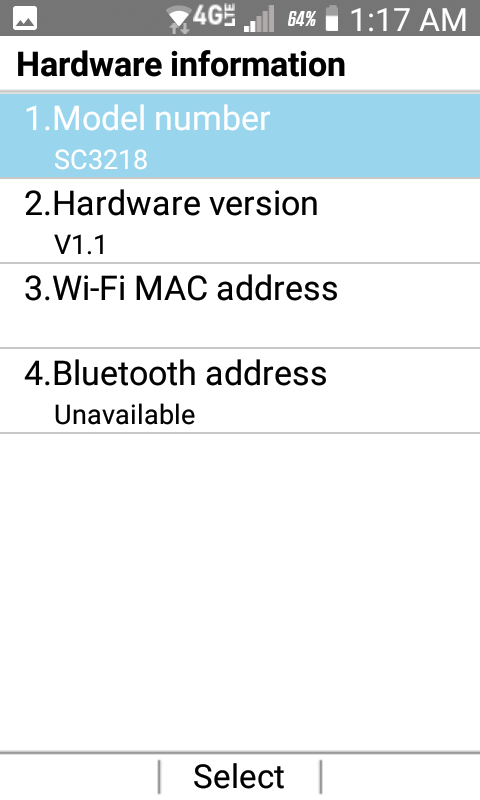
model: SC3218
hardware version: 1.1
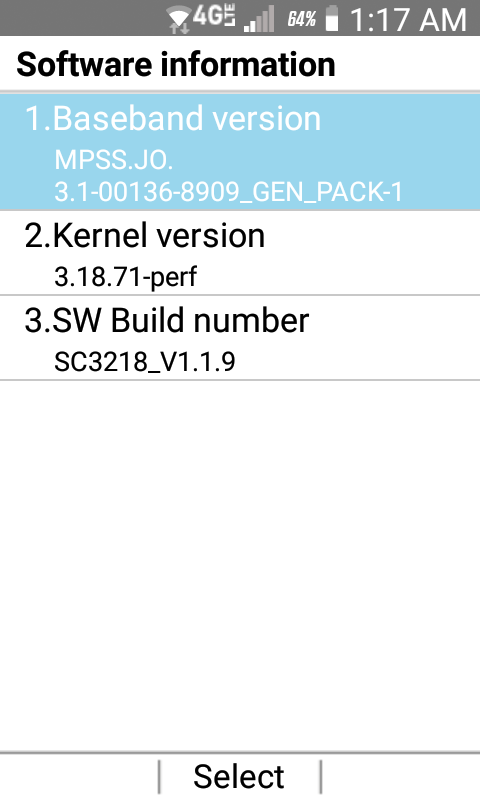
baseband: MPSS.JO.3.1-00136-8909_GEN_PACK-1
kernel: 3.18.71-perf
software build: SC3218_V1.0.7

I need to remove all of the Internet stuff, which apparently means I need to get Dev mode turned on.

Here is what I have tried:

  1. ##33284## result: none
  2. *#0808# result: none
  3. navigating to tools & settings/about phone/sw build number, selecting that and clicking “OK” 7 times. That does nothing.
  4. ADB devices does not show anything, which I suspect is because Dev mode is off (and therefore USB Debugging). Turning on “MTP” mode does not change that.
  5. as explained below, the mouse cursor only comes up inside the browser, so it cannot be used to click (substitute for tap) “software build”.
  6. long press on “*” (star) key. That only types a star.
  7. updating software. the response is “no updates”.
  8. installing apps. that isn’t possible because clicking on an APK file results in a screen asking if you want to install it, but with “OK” button grayed out. I came across a posting that says there is a security setting which stops app installs, and of course is only accessible in Dev mode.

this phone does not have a touch screen.

using an otg adapter with a USB mouse does not being up a mouse cursor, but if I launch the browser the mouse pointer does appear, without the mouse plugged in. I have checked the otg adapter and mouse on other phones, so I know they work.

so I cannot use the on-screen mouse to click “build number”, because it does not appear outside of the browser.

there is no “Lock Control 2.0” menu. I have tried connecting (successfully) to local WiFi and launching “software update”, but the result is “no updates”.

so if "Lock COntrol 2.0 is part of an update, I can’t get that or any other features tied to updates.

I can’t install apps from from APK files like AppManager, because installing apps requires permissions you cannot set without Dev mode.

I can turn on MTP mode, connect the phone to a PC, see the file system and copy files to the phone, but if I locate them in the phone file manager and click, the “install” button is disabled.

Schok told me that the latest software is v1.1.18, but they won’t give me a way to get it, because they say it’s “not supported”. I have the feeling that means “we want you to buy another phone”.

They confirmed that Lock Control 2.0 is part of the newer software.

The bottom line is that I can’t do anything unless I can I turn on Dev mode ?

It sounds like you figured that out.

I tried holding vol+power, but all that happened is that a very small version of the Schok logo appeared, and just sat there.

Any help ?

1 Like

Mine is SC3218_V1.1.9

The build number clicking 7 times works by me, I know there’s one version that broke the developer options on the Schok Classic, I believe there still is a way to get there even in that version, but not sure

When I click the “OK” button for about 2 seconds, a mouse pops up, likely only on newer versions though since I remember back in 2020 it wasn’t like that

Same by me

I’m able to install apps without adb

Yea I have it

Same by me, also they removed some critical recovery options in the android recovery menu in newer versions for some stupid reason

Idk but I do know that all your problems come down to not having the latest version, and their updater is broken for a few years now

1 Like

So you were able to get Dev mode working ?

could I ask you the huge favor of posting images of your phone showing the hardware and software versions on screen ?