What is the advantages of Android 17?
Discussion
What is the advantages of Android 17?
Discussion
Biggerrer number betterrer
Probably not much besides that I can try all the aluminium os apps that won’t install on 16.
#1 by FAR (for me  )
)
No root needed for librepods!!!
All new Android 17 features are based on AI
quick google search gave me this:
Android 17 is a powerful cyborg with limitless stamina, superhuman physical stats, and energy manipulation abilities. His main combat capabilities include generating energy barriers, rapid ki blasts, and flight. By Dragon Ball Super, he trains to gain Ki Sensing and enhanced barrier techniques, making him a top-tier fighter.
Meh
did it get a nickname like nougat or Oreo or something?
Not publicly but I remember somewhere that it has one officially
 Enhancing your multitasking and large screen device experiences
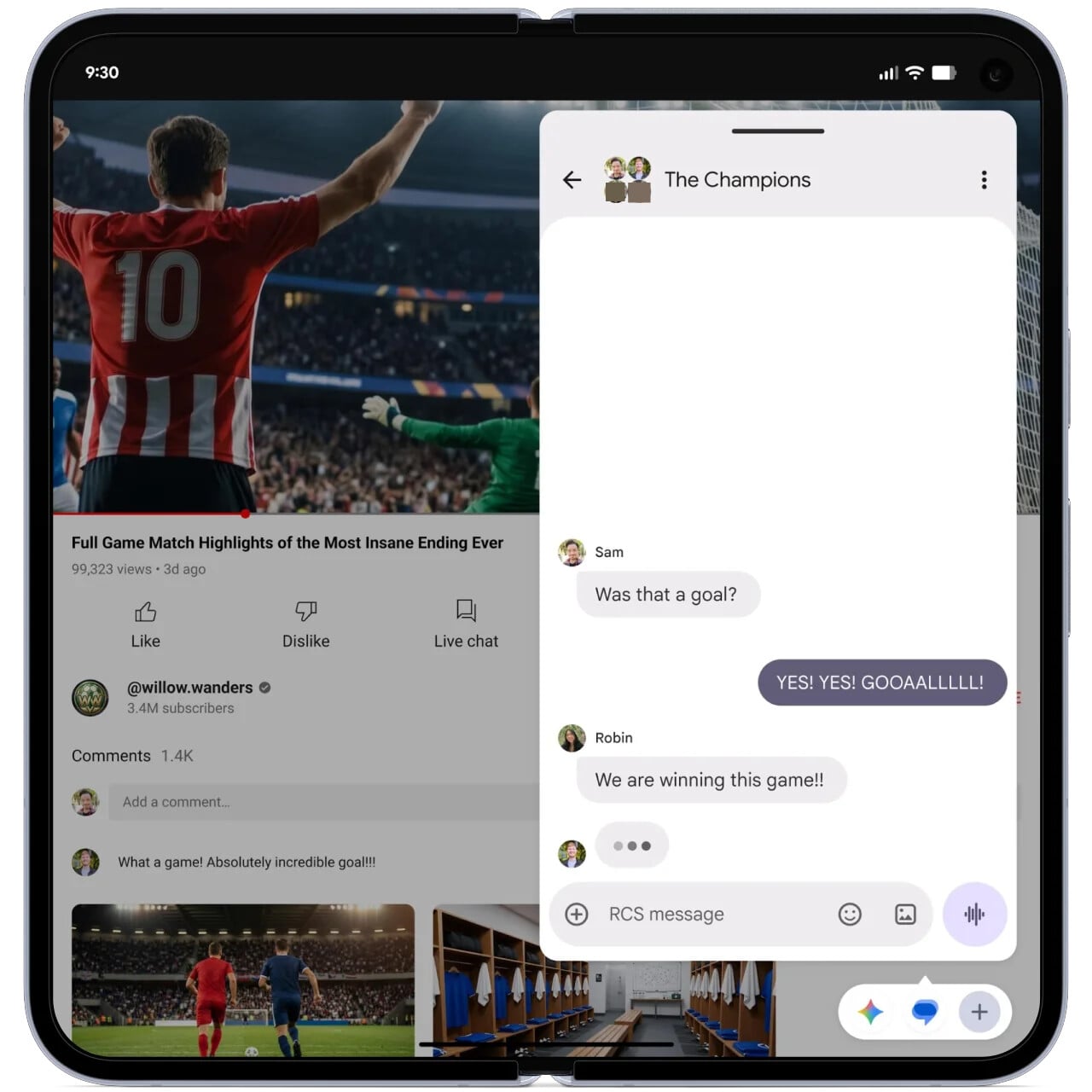
Multitask better with bubbles
From split-screen mode to desktop windowing, Android offers a variety of multitasking tools to help you be more productive. We’re extending these options with bubbles in Android 17!
In past releases, bubbles were limited to chat notifications, but in Android 17, they support more apps without any specific changes needed from developers. You can now launch any app in a floating window so you can view and interact with its content while using other apps. When you’re done, you can collapse or dismiss the window to return to what you were doing.
A big benefit of bubbles is that you can easily switch between multiple running apps without keeping them on screen all the time. Bubbles are only open when you need them, saving you from having to manually resize, rearrange, or dismiss them to regain precious screen space. And on foldables, this benefit is even more pronounced thanks to the bubble bar, which keeps your bubbles pinned to the corner of the screen, putting them within easy reach of your fingers.
Handy for travel, entertainment and work, bubbles lets you easily reference notes or maps, watch tutorials and even check sports.
Ensuring that apps adapt to any screen and window size
On large screen devices, restrictions on orientation, resizability, and aspect ratio no longer apply, allowing apps to fill the entire display window without pillarboxing (black bars). This change applies to apps targeting Android 17 and is designed to make apps better meet user expectations on large screen devices. Because Android runs on not just phones but also tablets, foldables, cars, TVs, and desktop environments, we want developers to build apps that are adaptive to any screen size and orientation!
Better support for widgets on external displays
With Android 17, we’re working to improve the visual consistency of widgets shown on connected displays with different pixel densities. The update provides developers a way to supply the system with information that allows it to resolve the correct pixel values at rendering time. For apps that use legacy pixel-based APIs for padding, text size, or layout attributes, the system now automatically scales these values based on the density difference between the app’s original context and the target display.
Interactive Picture-in-Picture for Desktop
Android 17 introduces a new interactive Picture-in-Picture mode for desktop environments. This feature allows apps to request that their PiP windows remain fully interactive while staying always-on-top of other app windows. For example, a video conferencing app could use this feature to keep call controls accessible while you navigate other apps.
Sounds good.
Another step in the direction of Android on desktop.
 New customization features for the home screen and apps
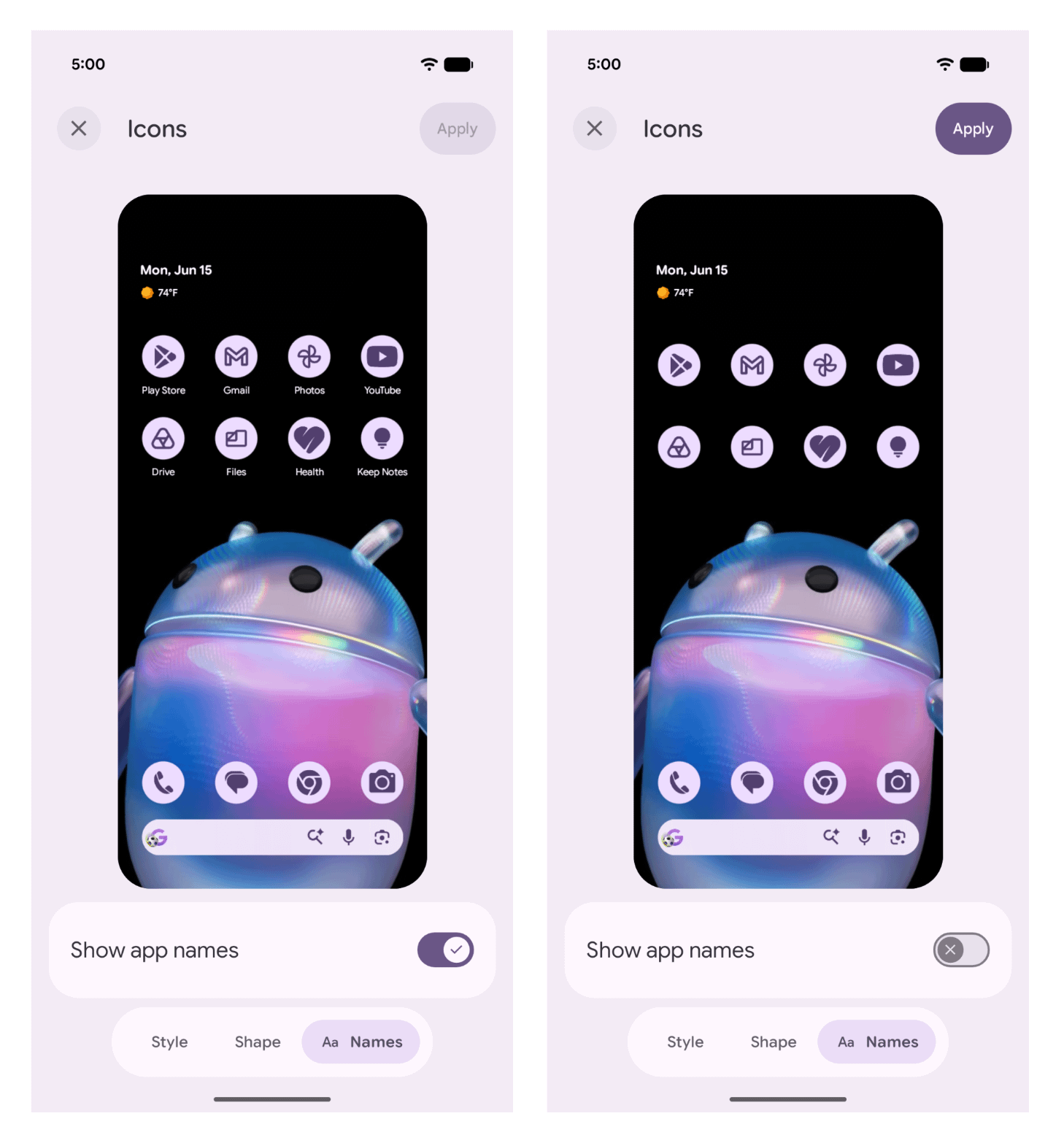
Hide app labels on the home screen
Android now provides a setting to hide app labels on the home screen! You can access this new setting on Pixel by opening Wallpaper & style then tapping Home screen > Icons > Names and toggling Show app names.
Per-app exceptions for Expanded Dark Theme
To create a more consistent user experience for users who have low vision, photosensitivity, or simply prefer a dark system-wide appearance, we introduced an expanded dark theme option in last December’s Android 16 QPR2 release. When this option is enabled, the system automatically applies dark theme to most apps that don’t support it.
However, because this option can cause some apps to display incorrectly, we have introduced the ability to selectively disable it on a per-app basis in Android 17. Apps with this setting turned off will use the standard dark theme option instead.
Expanded use of background blur
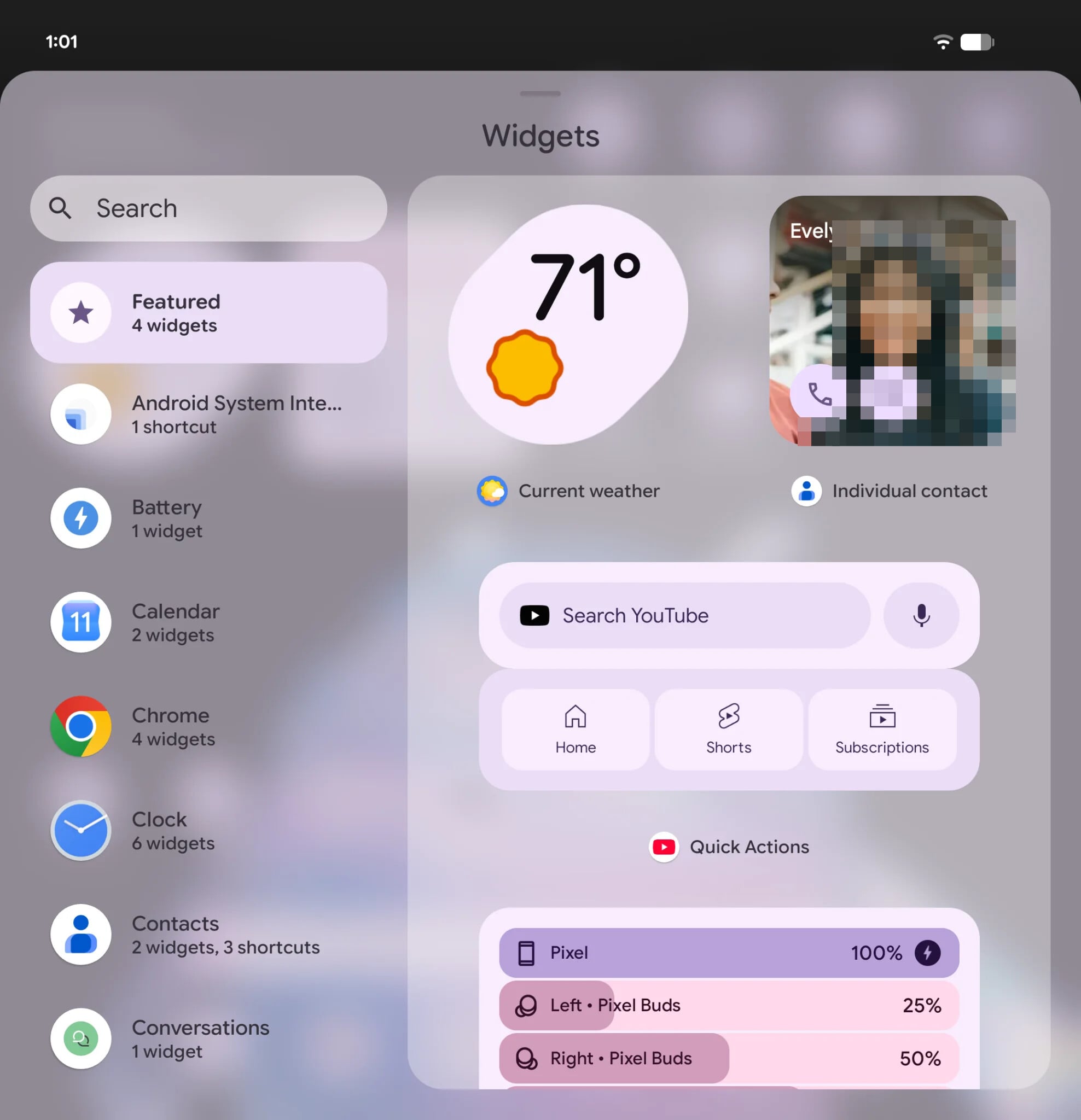
With the Material 3 Expressive redesign we introduced in Android 16, we subtly blurred the notification shade background to provide a sense of depth so you can stay aware of the apps you’re using in the background.
In Android 17, we’ve brought these blur effects to more parts of the UI like the widgets picker. And we are working on bringing background blur to even more surfaces, as seen in recent Android Beta and Canary builds!
Nice, but you could already easily do half of that with a third party launcher, and the other half will probably never make it to AOSP and will be left to OEMs to implement.
 More control over your Android gaming experience
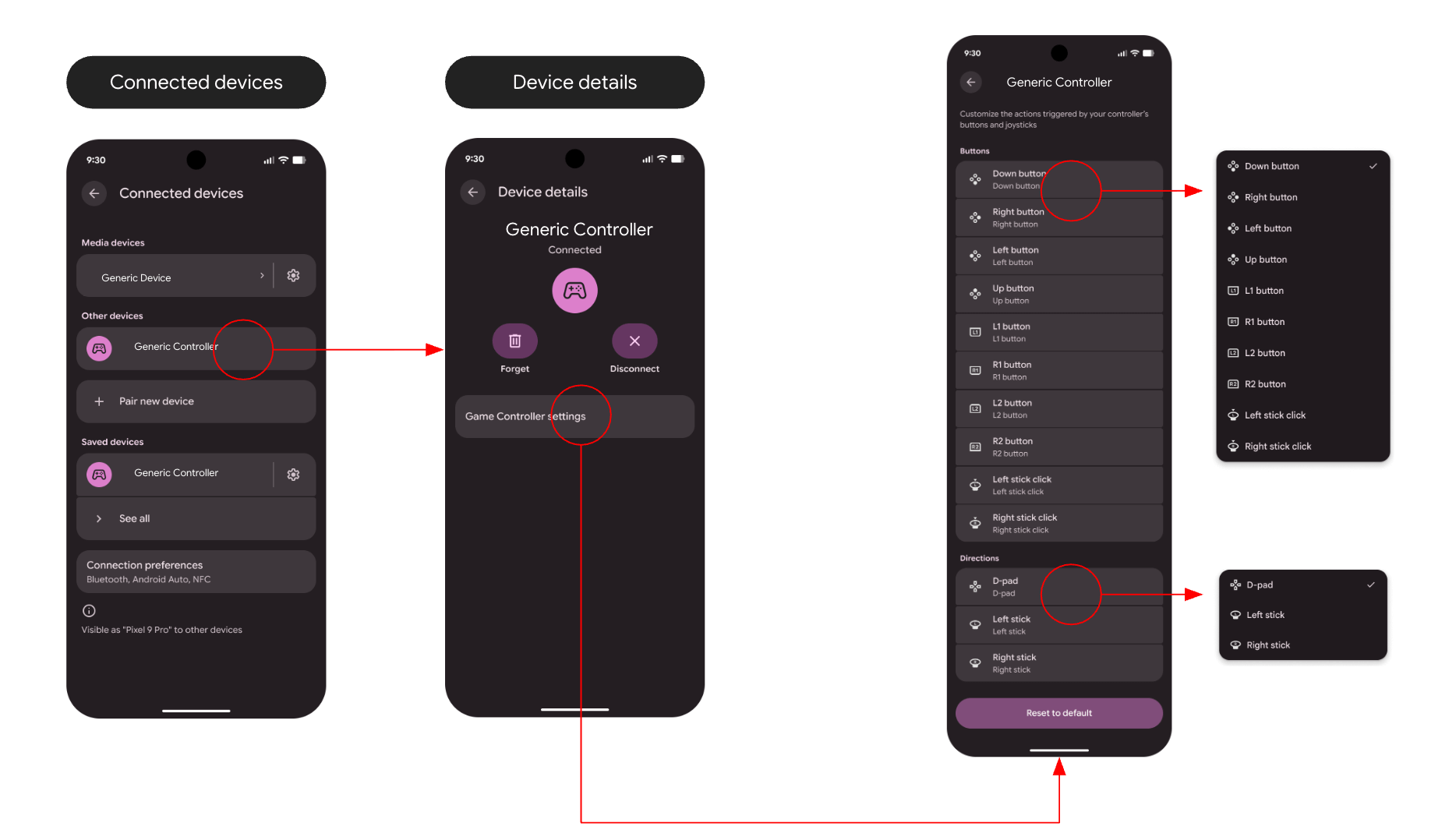
Remap the buttons on your physical gamepad with Game Controller settings
Android 17 introduces a native controller remapping feature, allowing you to adjust the controls on your physical gamepad to suit your specific needs.
Through the new Game Controller settings menu, you can customize the actions triggered by your controller’s buttons, sticks, or triggers at the system level. For example, you can remap a difficult-to-press thumbstick click to an easier-to-reach face button. Your remapping preferences are saved to your device so you don’t have to set them up every time you reconnect your controller.
A new way to game on foldables
Android 17 introduces foldable gaming mode, a new feature that makes full use of your foldable phone’s screen while you’re gaming. This feature splits your screen into a 50:50 layout with a game view on top and a dynamic gamepad below to make optimal use of your foldable phone’s screen real estate. Foldable gaming mode is part of the Android 17 platform and will be available on devices in the coming months.
This part actually sounds pretty cool, but most people don’t have foldables, and aren’t real gamers to really care about this.
 Protecting users with new security and privacy features on Android
Giving you more control over your contacts list
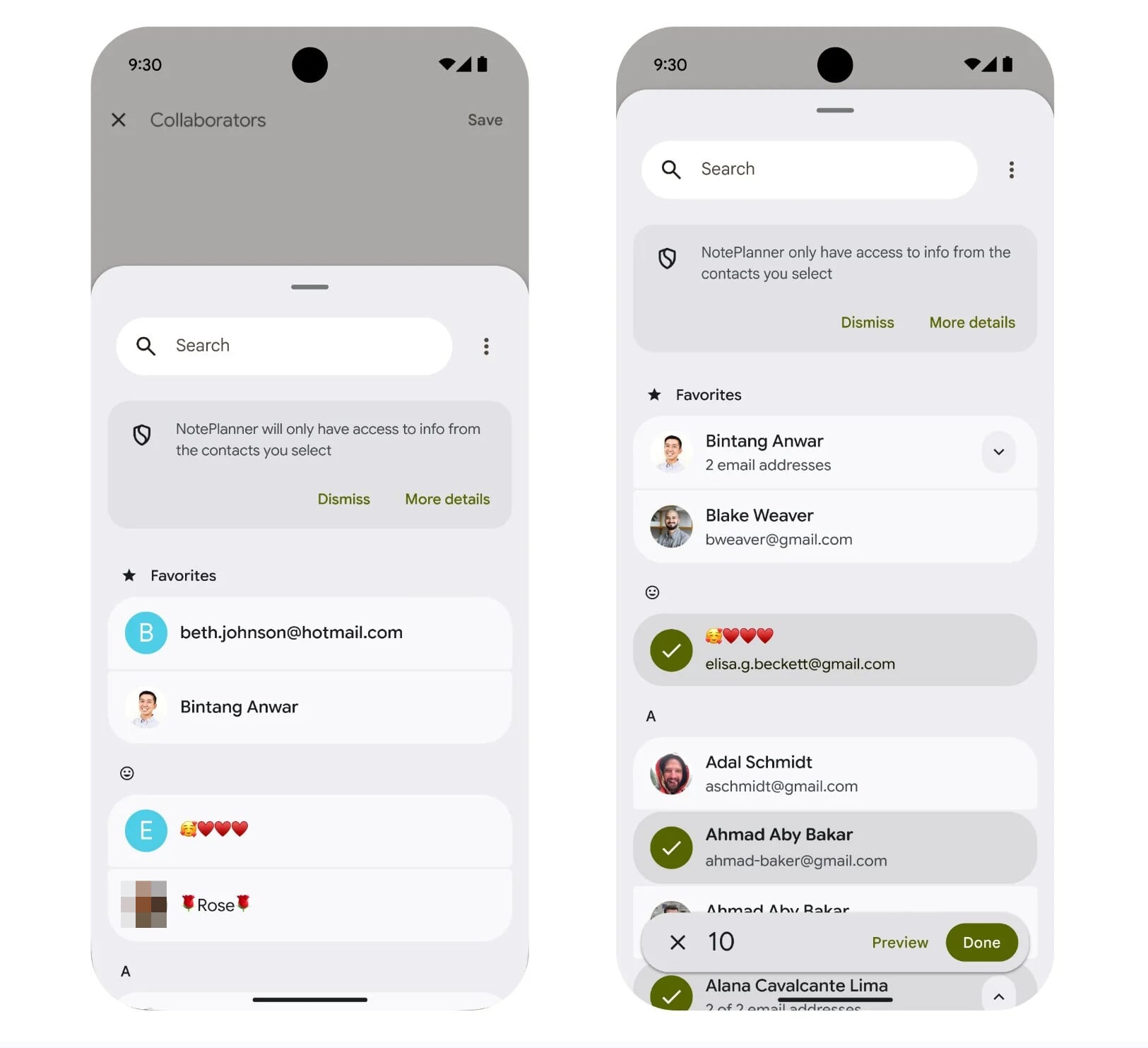
Android 17 introduces a new system Contact Picker that provides a standardized, secure, and searchable interface for sharing contacts with apps. Historically, apps needing access to a contact or two relied on the broad READ_CONTACTS permission which gave them access to your entire contacts list. Android’s Contact Picker addresses this by allowing you to grant apps access to only the specific contacts you choose.
For devices running Android 17 or higher, the system automatically upgrades certain contact selection intents to the new, more secure interface, but we want developers to integrate the new Contact Picker so they can take advantage of its new capabilities, like multi-selection support. To this end, Google Play will require that all applicable apps use it (or a privacy-focused alternative like Sharesheet) as the primary way to access users’ contacts. The broad READ_CONTACTS permission is reserved for apps that can’t function without it.
Making location access more private
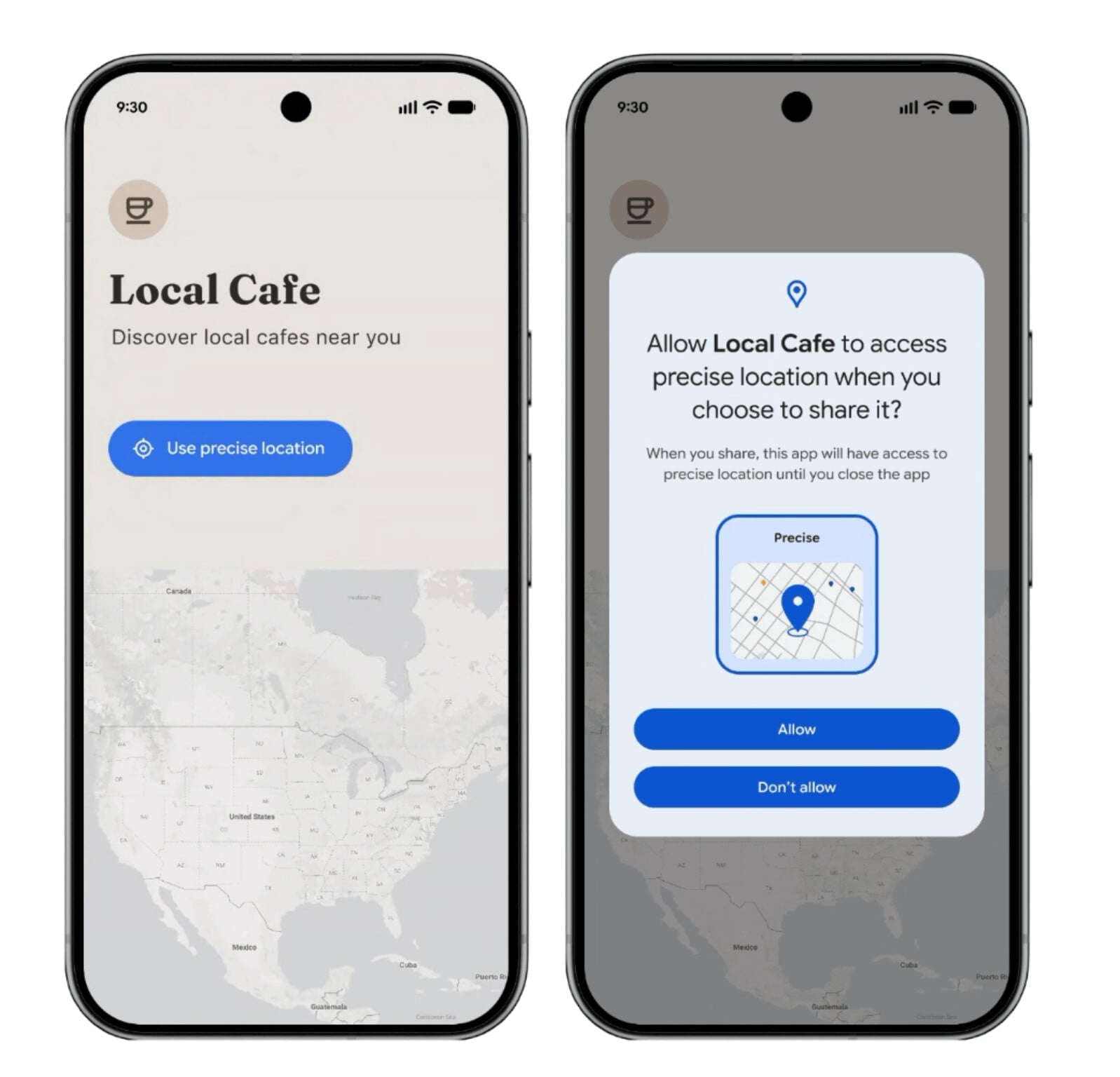
Android 17 introduces several new features to help you safeguard your private location information. This includes the Location Button, a new, privacy-conscious way for you to grant precise location access to apps. This is a system-rendered button that developers can embed directly into their apps. When you tap this button, the app is granted precise location for the current session only. Subsequent taps while running the app grant the permission immediately without showing a system dialog.
Developers can deploy this simple, private location flow for common tasks like finding a nearby shop or tagging a social post. And to increase adoption of the Location Button, Google Play will require apps to use it for one-time precise location access unless they require persistent, always-on location access.
Additionally, Android 17 now shows a persistent indicator in the status bar when a non-system app accesses your location. You can tap this indicator to see which apps have recently accessed your location.
The update also improves the algorithm for approximate (coarse) location to be aware of population density. This improves the privacy of granting an app approximate location access when you’re in a low-population area.
And lastly, Android 17 redesigns the location permission dialog to make the “Precise” and “Approximate” options more visually distinct.
Stronger protections against device theft
Following a successful pilot in Brazil, we’re enabling two of Android’s key theft protection features (Theft Detection Lock and Remote Lock) by default globally on all new Android 17 devices, as well as those freshly reset or upgraded to the latest OS.
On supported devices, Android 17 also significantly reduces the number of times someone can guess the PIN, pattern, or password and adds longer wait times between failed attempts. The update also refines how the lock screen shows information after failed attempts have been made.
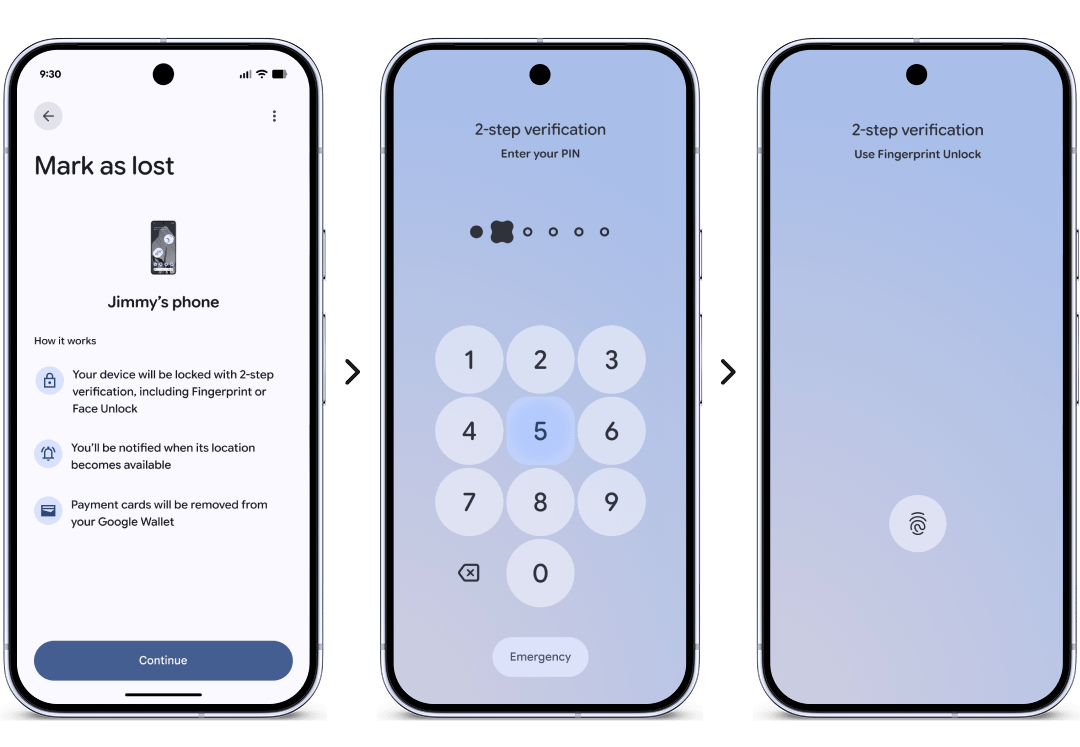
And we’re also enhancing Find Hub’s ‘Mark as lost’ feature by requiring biometric authentication in addition to your device’s PIN, pattern, or password. Marking a device as lost also now enables additional protections like hiding Quick Settings and disabling new Wi-Fi and Bluetooth connections.
Protecting your SMS OTPs from scammers
Scammers often try to hijack your one-time passwords (OTPs) to gain access to your accounts. To do this, they may deploy malicious apps that ask for permission to read your SMS. In Android 16, we introduced a protection that delays the delivery of messages containing an SMS retriever hash to most apps for three hours. Android 17 now extends this protection to all SMS messages containing an OTP. This means that even if a malicious app has been granted the SMS permission, it won’t be able to read your sensitive OTPs until after they have already expired.
New core protections for Advanced Protection
With Android 16, we introduced Advanced Protection, a single, opt-in device-level security setting that enables all of Android’s highest security features. We’ve been working to expand the protections offered under this setting with key upgrades like USB protection and Intrusion Logging, and now with Android 17, we’re continuing this work by introducing the following protections:
Improving safety against malicious apps
Live Threat Detection is a real-time security feature that analyzes app behavior to alert you if an app starts acting suspiciously, and we’re enhancing it to find and protect against more types of malicious apps.
With dynamic signal monitoring, Android will be able to warn you about apps that start doing things like changing or hiding their icon and then launching activities in the background or abusing accessibility permissions. To do this, Live Threat Detection will monitor application system interactions for known suspicious patterns in real time. Dynamic signal monitoring will be enabled on select Android 17 devices starting in the second half of the year.
Other enhancements
These privacy and security upgrades are probably the best part of the update
 Improvements to your Android media experience
Screen Reactions
In Android 17, we’re making it easier to record yourself and your screen at the same time with Screen Reactions. Available first on Pixel, this feature shows your face in a floating overlay on top of the screen. Android automatically puts the overlay at the bottom and cuts out the background so you don’t need a green screen, but you can move or resize the camera view and change the background color before or during a recording. Use this feature to make a reaction video, record a tutorial, or give feedback on a new app or document!
In addition, we’ve revamped the screen recording experience to add a floating toolbar that provides easier access to recording controls and capture settings. When you’re done recording, you can immediately view, edit, delete, or share your video.
Dedicated Assistant volume stream
Android 17 introduces a dedicated volume stream for Assistant apps. This change decouples Assistant audio from the standard media stream, allowing users to control both volumes independently. This enables scenarios like muting media playback while maintaining audibility for Assistant responses, and vice-versa.
Background audio hardening
Beginning in Android 17, apps cannot play audio, steal audio focus, or change the volume unless they are visible or have a foreground service. These restrictions on background audio interactions reduce unintentional buggy experiences and ensure that these actions are started intentionally by the user.
Enhancements to Live Update notifications
Live updates provide a summary of important updates so users can track progress without opening the app. The system promotes Live Update notifications so they appear more prominently in the notification drawer, on the lock screen, and on the status bar.
With Android 17, we’re introducing a metric style template designed specifically for health and fitness apps, timers, and travel apps. In addition, developers can use the new Semantic Coloring API to visually convey state changes, providing highly glanceable, color-coded notifications.
Other enhancements:
Nu nu
 Making your apps and devices work better together
Unifying the widgets experience across platforms
Android 17 marks a shift towards a single, Compose-based development model for all widgets. By unifying the experience across mobile, cars, and Wear OS, developers can soon scale UI components across the ecosystem with a familiar workflow. The goal is to minimize the effort needed by developers to bring their widgets to more surfaces.
https://reddit.com/link/1u7l1cw/video/haep717hko7h1/player
Additionally, Android 17 introduces new platform functionality to make widgets work better on Auto. The update adds support for widgets on cars, allowing you to see the things that matter to you at a glance, even while actively navigating. For example, you can add a shortcut to your favorite contacts, a one-tap garage door opener, a weather overview and more. Widgets will be available to users of Android Auto later this year and to cars with Google built-in later on.
Hand off your tasks with Continue On
Continue On is a new feature available in Android 17 that enables users to start an app on one device and then transition to another device in their Android ecosystem, continuing the journey they started. It’s designed to work bidirectionally, meaning that any supported Android device can both send and receive app activities, though, at launch, Continue On will first support mobile-to-tablet transitions. In the tablet taskbar, users will see a suggestion for the most recently opened app from their mobile device.
https://reddit.com/link/1u7l1cw/video/doxh917pko7h1/player
Updates for companion device apps
Android 17 introduces two new profiles to the CompanionDeviceManager API to simplify device distinction and permission handling. These include the medical device profile and the fitness tracker profile. Furthermore, the system now offers a unified dialog for device association and nearby permission requests, reducing the number of dialogs you’ll see.
 Optimizations to make your apps & device run better
These include:
 Expanding Android Parental Controls to all devices
These parental controls are located directly within Android Settings and provide a single, convenient home for both built-in device controls and Google Family Link. These controls are protected by an easy-to-set PIN and allow you to:
Android Parental Controls also provide a direct path to easily set up Google Family Link in the Family Link app on a parent’s phone, which offers additional features like School Time, Google Play app purchase approvals, location alerts, and more.
Filtering tools built in to Android?
Pretty good.
 Other quality-of-life improvements
 Bug fixes and security patches
Please refer to the Android Security Bulletin for details on the security vulnerabilities addressed with this platform release.
There are plenty of other changes in Android 17, especially for developers! For example, Android 17 expands the capabilities of AppFunctions, introduces an EyeDropper API, makes the aspect ratio of images in the Photo Picker more customizable, and much more. To learn more about everything new for developers in this release, visit developer.android.com.
Also, don’t forget that select advanced devices will be getting Gemini Intelligence features later this summer. In addition, we’re introducing Android Halo in a future Android 17 release to give you at-a-glance visibility into what your agent is working on at any given time. Lastly, be sure to check out our latest Android Drop to learn about what new features are coming to all Android devices, not just those running Android 17!
Basically, there is a lot new, more than I expected, although I don’t really care, because it’s not like I’ll be using Android 17 anytime soon.
Meanwhile, I’m waiting for an Aluminium based BlissOS, or Android for random non GoogleBook laptops, and we won’t have that for at least a few years.
cinnamon bun
I have it for the last 6 months. The beta stuff.
Honestly I don’t see a big difference to android 16…
Which phone?
How could i be that a bunch of people are talking about Android 17 being released yesterday, but not one word about KDE 6.7 being released?
Pixel 10 pro
(No I’m not a stalker)
P10P
I think it is called vanilla ice cream
That’s android 15, android 17 is cinnamon bun