# Free Windows Whitelist Filter / Remove Internet Filter
**URL:** https://jtechforums.org/t/free-windows-whitelist-filter-remove-internet-filter/6981
**Category:** Filters
**Created:** [May 10, 2026, 11:04pm UTC](https://jtechforums.org/t/free-windows-whitelist-filter-remove-internet-filter/6981 "2026-05-10T23:04:16Z")
**Posts on this page:** 20
**Page:** 3
### Author:  [@Shalom\_Karr](https://jtechforums.org/u/Shalom_Karr)
#### Post date: [May 12, 2026, 12:07am UTC](https://jtechforums.org/t/free-windows-whitelist-filter-remove-internet-filter/6981/41 "2026-05-12T00:07:33Z")
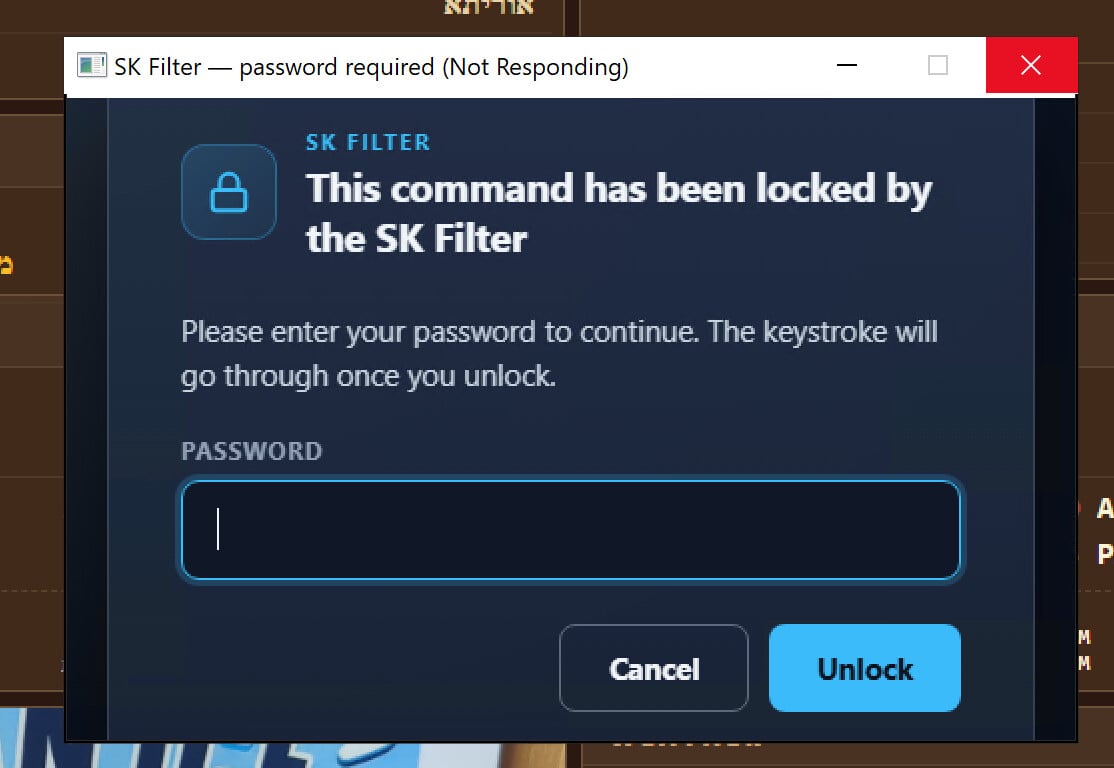
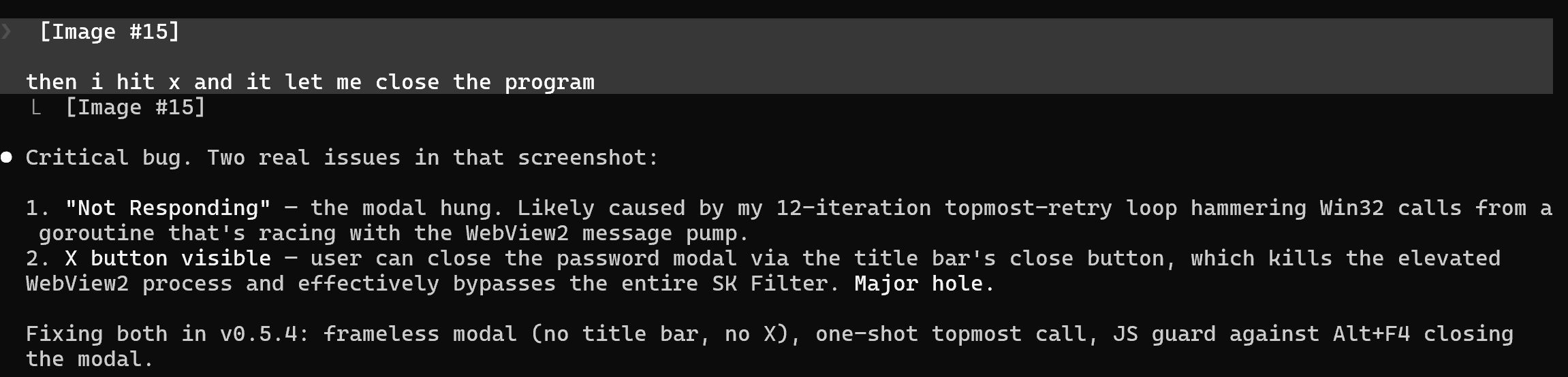
Bad bypass it let me x out the modal when it said not responding and had an option to close the program that was not responding and filter is off
---
### Author:  [@Shalom\_Karr](https://jtechforums.org/u/Shalom_Karr)
#### Post date: [May 12, 2026, 12:25am UTC](https://jtechforums.org/t/free-windows-whitelist-filter-remove-internet-filter/6981/42 "2026-05-12T00:25:04Z")
Going to Push V1 for release soon
Its pretty secure because it forces kiosk mode and reboots itself immediately on launch and when you close it and you can’t even hit the windows key without having the password
---
### Author:  [@Shalom\_Karr](https://jtechforums.org/u/Shalom_Karr)
#### Post date: [May 12, 2026, 12:54am UTC](https://jtechforums.org/t/free-windows-whitelist-filter-remove-internet-filter/6981/43 "2026-05-12T00:54:21Z")
I just wanted to give you all an update
**Source + downloads:** [GitHub - Shalom-Karr/kiosk-exit-guard · GitHub](https://github.com/Shalom-Karr/kiosk-exit-guard)
**Landing page:** [kiosk-exit-guard — Windows 11 Home kiosk lockdown](https://shalom-karr.github.io/kiosk-exit-guard/)
## What it does
- **One website, fullscreen** — uses Microsoft’s embedded WebView2 (same engine as Edge, already on every Win10/11 machine) to render exactly one URL fullscreen. No tabs, no address bar, no menus.
- **Locks the keyboard behind a password.** Every Ctrl / Win / Alt combo (Win+R, Alt+F4, Alt+Tab, Ctrl+Shift+Esc, even pressing the Windows key alone) pops up a password modal. Wrong password = the keystroke is swallowed.
-Correct password = the keystroke is replayed via `SendInput` and goes through to the focused window. The only allowed combos are **Ctrl+R and F5** (page reload), so the kiosk can be refreshed without unlocking.
- **Disables Task Manager + Run dialog** via the standard HKCU policy registry keys when the filter is active. Also disables right-click context menus on the taskbar and desktop (otherwise you could right-click the kiosk’s taskbar entry and pick “Close Window”).
- **Uninstalls Chrome and blocks Edge launches** at the OS level using Image File Execution Options redirects. Edge stays installed (Windows internals need it) but any attempt to launch it silently fails. Both blocks are re-applied every time the controller starts so a Windows Update can’t accidentally restore browser access.
- **Pause when you need to use the computer normally.** Hotkey `Ctrl+Shift+Alt+K` or a desktop button → password → pick how long to pause (1, 5, 10, 20, 30, 45 minutes, or custom up to 100). During the pause, Edge becomes launchable, Task Manager works, taskbar comes back. When the timer ends, everything snaps back automatically. **There’s no “turn off forever” path** — every pause has an expiry.
- **Self-installing.** First run drops the exe in `C:\Program Files\KioskExitGuard`, sets up a Task Scheduler entry that re-launches the controller at every user logon AND every minute as a watchdog (so the controller comes back within a minute if something kills it), creates 6 desktop shortcuts (Pause / Resume / Launch Kiosk / Change Kiosk URL / Update / Uninstall), and walks you through password + URL via a wizard.
- **Self-updating.** Built-in “Update SK Filter” button hits GitHub’s release API, downloads the new exe, atomic-renames the running binary out of the way, and restarts the task. Password-gated.
---
### Author:  [@Shalom\_Karr](https://jtechforums.org/u/Shalom_Karr)
#### Post date: [May 12, 2026, 1:27am UTC](https://jtechforums.org/t/free-windows-whitelist-filter-remove-internet-filter/6981/44 "2026-05-12T01:27:39Z")
# Changelog
All notable changes to kiosk-exit-guard, newest first. Versions follow [Semantic Versioning](https://semver.org/) with the convention that 1.0.x is the stable line and 0.x was prototyping.
For the current state of the project, see the [landing page](https://shalom-karr.github.io/kiosk-exit-guard/), the architecture doc, and the admin runbook.
## v1.0.6 — 2026-05-12
**Production-readiness fixes from a multi-agent security and UX audit.**
Security:
- Per-process random re-injection nonce. The old `kioskMarkerCode = 0xC0DE` fixed constant meant any other process could call `SendInput` with that ExtraInfo value and bypass the LL keyboard hook. Replaced with a `uintptr` drawn from `crypto/rand` at controller startup and never written to the log file. Every process restart re-randomizes; no attacker-observable value.
- Taskbar hidden while the filter is active. `applyLockdown` now writes `NoTaskbar=1` under `HKCU\…\Policies\Explorer` and restarts Explorer so the change takes effect immediately. Closes the Start-button left-click escape — a user could previously click Start, then click the kiosk’s taskbar entry to focus and close it.
- WebView2 kiosk hardening. Default context menus, dev tools (F12 / Ctrl+Shift+I), the status bar, and zoom controls are disabled via the WebView2 `Settings` object. `NewWindowRequested` is handled and rejected, so popups, target=\_blank links, and `window.open` calls cannot spawn a second WebView2 window outside the kiosk. Closes the file-picker, dev-tools, and child-window escape paths.
- IFEO Debugger redirects extended to accessibility helpers. `sethc.exe`, `osk.exe`, `narrator.exe`, `utilman.exe`, and `magnify.exe` now redirect to `kiosk-exit-guard --silent-exit` alongside `chrome.exe` / `msedge.exe`. Closes the Sticky-Keys-five-shifts / Narrator / Ease-of-Access escape that ran an accessibility tool above the kiosk.
- Atomic CompareAndSwap on `promptOpen` inside `hookCallback`. The previous check-then-set was TOCTOU — a second blocked combo arriving while the first was still being dispatched to the goroutine could overwrite `pendingComboV` and re-inject the wrong keystroke after auth. The hook itself now owns the CAS so only one in-flight prompt can exist.
- Modifier snapshot captured inside `hookCallback` synchronously. `capturedModifiers()` used to be called by the goroutine after the 200+ ms WebView2 modal spawn delay; a user who released the modifiers in that window would re-inject a bare key on success. Captured at the moment the LL hook fires now, so re-injection always uses the modifier state at press time.
UX:
- Password modals now distinguish cancel from wrong-password. `askPasswordModal` returns a `passwordResult` enum (`pwOK` / `pwWrong` / `pwCancel`); every call site was rewritten so a user clicking Cancel no longer triggers the “Wrong password” toast. Cancelling the pause / update / uninstall / reset / set-url flows is now silent (the correct affordance) rather than shaming.
- Wrong-password retry happens inline inside the modal. Up to 3 attempts; the error appears in the modal’s `#err` div (kept hidden until needed) with “N attempts left” feedback. Eliminates the cold-start delay of spawning a second WebView2 host just to render a “Wrong password” toast — the existing modal stays up and the input is re-focused and cleared.
- Cross-process modal serialization via a `Global\KioskExitGuardPromptMutex` named mutex. Previously, double-clicking the “Pause SK Filter” shortcut twice in quick succession opened two stacked fullscreen modals. The second `askPasswordModal` call now detects the existing owner, shows “Another SK Filter prompt is already open — finish that one first”, and returns immediately.
- `--pause` shortcut now refuses to re-pause when a pause is already in flight. Previously it would silently overwrite a 100-minute pause with a fresh 5-minute one. Now shows the existing pause’s remaining time and points the user at “Resume SK Filter” to end early.
- `--resume` shortcut shows a confirm dialog with the remaining pause time before clearing the pause. Prevents misclicks during long pause windows from snapping the kiosk back. Also no-ops with feedback if no pause is in flight.
- `sync` loop gained a third branch: if the on-disk pause deadline is rewritten while the controller is already paused (a future feature: extending a pause from another process), the controller re-arms its `time.AfterFunc` timer to the new deadline rather than auto-resuming early based on the old one.
- `--update` flow now stops the controller’s scheduled task before attempting the exe rename. Previously the rename failed with “access is denied” because Windows held an exclusive lock on the running .exe, and the admin had no in-UI path forward. The update now: `schtasks /End` → `taskkill` → 500 ms settle → up-to-5 rename retries → `schtasks /Run`. On rename failure the controller is automatically restarted so the device isn’t left unprotected.
- First-run wizard falls back to plain zenity dialogs when WebView2 creation fails. Previously a WebView2 crash on a stripped Windows image left the admin with no setup path and a silent `os.Exit(1)`.
- First-run wizard cancel/X-out now shows an explanatory dialog instead of a silent exit so the admin understands they need to re-launch.
- Chrome silent uninstall is now bounded by a 60s `context.WithTimeout`. Hung uninstallers no longer freeze first-run setup; the IFEO block is what actually prevents kiosk-escape via Chrome, so a leftover install is non-fatal.
- Kiosk URL prompt validates the scheme (`https://`, `http://`, `file:///`). Previously a typo like `htttp://example.com` saved silently and the WebView2 child showed a Chromium error page; the prompt now loops with a warning until the URL is valid.
- Uninstall reports failures in plain English mapped to remediation (“Open Task Scheduler and delete the task named …”) instead of dumping raw `schtasks` output into a zenity dialog. Raw output is still written to `kiosk-exit-guard.log` for diagnosis.
- Pause-duration cancel now shows “Pause cancelled. SK Filter is still active.” so a misclick is obvious instead of silent.
- Set-URL flow recognizes the zenity-cancel error and treats it as a clean exit rather than surfacing the raw “dialog cancelled” error message.
## v1.0.4 — 2026-05-11
**Logging + panic recovery.**
- Added `kiosk-exit-guard.log` next to the exe (append-only, naive 5 MB rotation to `.log.old`). Captures controller startup, hook installation, pause start/expire, errors. Initialized at the top of controller `main()`.
- `recoverAndLog()` deferred in the watchdog and sync-loop goroutines so a panic gets a full stack trace into the log file before the goroutine dies.
- `--silent-exit` skips log init to keep the IFEO redirect fast.
## v1.0.3 — 2026-05-11
**Modal hang fix, DPI awareness, multi-trigger task, two new desktop shortcuts.**
- Stripped `SetForegroundWindow` + `BringWindowToTop` from `makeModalFrameless`. They have eligibility rules (foreground lock, input focus thread) and were the primary cause of the “blank white page + Not Responding” hang on some builds. The remaining `SetWindowLong(WS_POPUP)` + `SetWindowLong(WS_EX_TOPMOST)` + `SetWindowPos(HWND_TOPMOST)` is enough to put the modal above the kiosk.
- Added per-monitor-v2 DPI awareness via `app.manifest`. `GetSystemMetrics(SM_CX/CYSCREEN)` now returns physical pixels on 4K displays instead of scaled values; kiosk window fills the native resolution.
- Replaced `schtasks /Create /SC ONLOGON` with PowerShell `Register-ScheduledTask`. New triggers: `AtLogOn` + every-1-minute watchdog. Settings: `MultipleInstances=IgnoreNew`, `ExecutionTimeLimit=0`, `RestartOnFailure` 3×1min, `AllowStartIfOnBatteries`, `StartWhenAvailable`. If the controller dies mid-session it comes back within 1 minute.
- Non-first-run launches now re-register the scheduled task too — existing installs auto-upgrade to the multi-trigger format just by launching the new exe.
- **“Launch Kiosk”** desktop shortcut + `--launch-kiosk` flag. Manually spawns the WebView2 child if the filter is active. Refuses during pause so it can’t silently defeat pause semantics.
- **“Change Kiosk URL”** desktop shortcut + password-gated `--set-url`. After URL save, kills the kiosk child so the watchdog respawns at the new URL within seconds.
## v1.0.2 — 2026-05-11
**Robust uninstall + docs.**
- Uninstall flow rewritten to handle the “kiosk keeps coming back after uninstall” bug. Order reversed: kill processes first (gopsutil + taskkill belt-and-suspenders), then end+delete the scheduled task, then wipe registry / files / shortcuts. Errors are now collected and surfaced in the result dialog instead of silently discarded. Final step runs `schtasks /Query` to verify the task is actually gone.
- Added `docs/architecture.md` — full breakdown of modes, state surface (HKLM / HKCU / IFEO / files / task scheduler / shortcuts), goroutine model, and three main flows (blocked combo, pause, first-run).
- Added `docs/admin-runbook.md` — day-to-day tasks, verification PowerShell queries, recovery scenarios (lost password, `--reset`, kiosk keeps coming back, IFEO leftover, WebView2 install failed), upgrade paths.
## v1.0.1 — 2026-05-11
**Modals and toasts always frontmost.**
- Password modal topmost is now instant. v1.0.0 waited 220 ms before applying frameless+topmost — modal was visible behind the kiosk for that window on slow systems. Replaced with a 15 ms tight poll that applies the style the moment `Window()` returns a valid HWND. Same one-shot model (no retry storm).
- Toast notifications now use a custom WebView2 toast instead of zenity. zenity dialogs aren’t topmost, so “Wrong password” and “Filter paused” toasts appeared behind the kiosk and were effectively invisible. New `showFrontmostToast()` uses the same dark-themed styling, applies `makeModalFrameless` via the same tight poll, and the page auto-closes itself after the requested duration. Falls back to zenity if WebView2 is unavailable.
## v1.0.0 — 2026-05-11
**Feature-complete release of the 0.x line.**
- Taskbar right-click context menu disabled when filter active: `NoTrayContextMenu=1` + `NoViewContextMenu=1` HKCU policies. Closes the “Win key → right-click taskbar → Close Window” escape that worked even after we gated the Win key.
- Clean-slate install. First-run purges leftover state from any prior install before the wizard runs — zombie controller processes, dangling IFEO blocks, stale scheduled task, orphan shortcuts, leftover state files. Reinstalls always start from zero.
- Anti-zombie kill at controller startup. Before installing the LL keyboard hook, the controller enumerates other `kiosk-exit-guard.exe` processes and terminates them. Prevents two controllers fighting over the hook and stale in-memory password hashes surviving an `--uninstall`.
- Embedded `currentVersion` bumped to 1.0.0 — the self-update flow uses this to compare against GitHub’s latest release tag.
## v0.5.5 — 2026-05-11
**Self-update flow, Windows-key-alone gate, uninstall kills controller.**
- **“Update SK Filter”** desktop shortcut + `--update` flag. Hits `api.github.com/repos/.../releases/latest`, compares against embedded `currentVersion`, prompts on a newer release, password-gates the install, downloads the new exe to TEMP, atomic-renames the current exe to `.old`, drops the new exe in place, then `/End` + `/Run` the scheduled task so the new binary loads.
- Windows key alone now opens the password modal. Pressing Win by itself used to open Start menu, which let the user click the kiosk’s taskbar entry and close it. Tracked via `winKeyChord` atomic.Bool: set true on Win down, cleared if any non-modifier key arrives while Win is held (combo path), checked on Win up — if still true → Win alone → password prompt + re-inject.
- `--uninstall` now kills the running controller process. Without this, `--uninstall` wiped HKLM and the scheduled task but the running controller process kept enforcing the filter from in-memory state until reboot.
## v0.5.4 — 2026-05-11
**Frameless modal, --resume + --uninstall, fix modal hang.**
- Frameless password modal — close the “kill the modal to bypass the filter” hole. The modal had a standard title bar with an X close button; clicking X destroyed the elevated WebView2 process and bypassed the password gate. Now stripped to `WS_POPUP|WS_VISIBLE` with `WS_EX_TOOLWINDOW` so it has no title bar, no taskbar entry, and no Alt+Tab presence. Cancel + Esc remain the only dismissal paths.
- Modal-hang fix. The v0.5.2 12-iteration topmost retry loop was hammering `SetForegroundWindow` + `BringWindowToTop` on the WebView2’s HWND from a competing goroutine, racing the message pump. The modal showed “Not Responding” because the message loop was starved. Replaced with one Win32 round-trip after a 220 ms settle.
- **“Resume SK Filter”** desktop shortcut + `--resume` flag. NOT password-gated. Resuming makes the system more locked-down so anyone can trigger it. Pausing keeps the password gate.
- **“Uninstall SK Filter”** desktop shortcut + `--uninstall` flag. Password-gated and confirm-dialog gated. Removes IFEO blocks, HKCU lockdown, HKLM config key, scheduled task, all desktop shortcuts. Leaves the exe on disk — admin handles that manually.
- Cancel button added to the first-run wizard (Esc dismisses too).
## v0.5.3 — 2026-05-11
**“Pause SK Filter” desktop shortcut + --pause flag.**
- First-run now drops a second desktop shortcut for Pause. Double-click → UAC consent → password modal → duration picker. Same flow as the `Ctrl+Shift+Alt+K` hotkey, just one click away.
- The `--pause` invocation is a fresh elevated process that writes the pause state to disk, removes IFEO blocks + HKCU lockdown, kills the kiosk WebView2 child.
- New 2-second polling goroutine in the controller (`syncFilterStateLoop`) reconciles in-memory `filterMode` + lockdown state with the pause file. When an external `--pause` flips the file, the controller picks it up within ~2 seconds.
## v0.5.2 — 2026-05-11
**Fix hotkey modal hidden behind kiosk, allow Ctrl+R / F5.**
- Pressing `Ctrl+Shift+Alt+K` appeared to do nothing. The password modal WAS being created, but behind the fullscreen `HWND_TOPMOST` kiosk WebView2 window. Fix: after creating the modal, a goroutine calls `SetWindowPos(HWND_TOPMOST)` + `BringWindowToTop` + `SetForegroundWindow` on the modal’s HWND repeatedly for the first ~1 second.
- `Ctrl+R` was caught by the “block any Ctrl/Win/Alt combo” sweep, so the kiosk page couldn’t be refreshed without entering the password. New `isAlwaysAllowedCombo()` check runs before the broad block. Allowlists `Ctrl+R` and `F5`.
## v0.5.1 — 2026-05-11
**Default-ON, pause-only model with 1–100 min durations.**
The filter is now ALWAYS ON by default. There is no “turn off” path — only a time-bounded pause. After the pause expires the filter resumes automatically with no user intervention.
- Hotkey is now a pause trigger, not a toggle. When filter is active: password prompt + duration picker. When already paused: hotkey just shows remaining time.
- Durations: 1 / 5 / 10 / 20 / 30 / 45 minutes preset, or custom 1–100.
- During a pause: kiosk WebView2 window closes, Edge IFEO block is lifted (Edge can be launched), HKCU registry lockdown is removed.
- Pause expiry re-applies everything automatically.
- Branded password modal copy: “This command has been locked by the SK Filter — Please enter your password to continue.” Modal sized to 520×360 with a lock icon header and “SK Filter” brand badge.
## v0.5.0 — 2026-05-11
**Desktop shortcut, branded WebView2 dialogs, password-gated re-injection.**
- WebView2 Runtime auto-install: controller detects missing runtime via the canonical EdgeUpdate `pv` check, downloads the evergreen bootstrapper from `go.microsoft.com/fwlink/p/?LinkId=2124703` to TEMP, runs it silently. No-op on Win10/11 client SKUs (runtime ships pre-installed). On Server 2022 / stripped images, removes the manual install step.
- Desktop shortcut created during first-run via PowerShell + `WScript.Shell` COM. Self-heals on every controller launch.
- Branded WebView2 first-run wizard. Single page collecting password + URL with form validation, replacing the chain of small zenity prompts. Dark themed to match the kiosk landing page.
- Branded WebView2 password prompt. Autofocused input via attribute + `setTimeout(...,0)` + `load` event so the user can start typing the instant the modal appears. Falls back to zenity when WebView2 isn’t available.
- Password-gated re-injection for ALL blocked combos. Previously the hook silently swallowed Ctrl/Win/Alt combos other than Alt+F4. Now any blocked combo captures the key + modifier state, opens the branded password modal, and on correct password replays the original combo via `SendInput` with a marker in `ExtraInfo` so our own hook doesn’t re-block it.
## v0.4.1 — 2026-05-11
**Auto-install WebView2 Runtime if missing.**
The controller detects missing WebView2 Runtime on every launch via the canonical `pv` check under `HKLM\Software\Microsoft\EdgeUpdate\Clients\{F3017226-…}`. If not installed, downloads the evergreen bootstrapper and runs it silently. Adds `net/http` to the dependency closure — exe size goes from 4.0 MB to ~7.6 MB.
## v0.4.0 — 2026-05-11
**WebView2 kiosk window, Chrome uninstall, Edge IFEO block.**
Replaces the Chrome subprocess + watchdog with an embedded WebView2 kiosk window. Same exe re-launches itself with `--webview` when filter mode flips ON; the WebView2 instance is fullscreen, topmost, frameless, JS-locked to refuse navigation outside the configured URL.
- Set password (HKLM)
- Set kiosk URL (HKLM)
- Uninstall Chrome silently via registry `UninstallString` + `--force-uninstall`
- Apply IFEO Debugger redirects on `chrome.exe` and `msedge.exe` so any launch attempt invokes our exe with `--silent-exit` and exits silently
- Install Task Scheduler startup entry
- `--silent-exit` flag wired at the top of `main()` so IFEO-redirected launches die before any setup runs
- Adds `github.com/jchv/go-webview2` (pure-Go bindings, no CGo)
## v0.3.0 — 2026-05-11
**Chrome watchdog, broad keystroke blocking, HKLM password storage.**
- Chrome kiosk watchdog: 30-second tick that launches `chrome.exe --kiosk` at the configured URL and re-launches if killed.
- Broader keystroke blocking: filter mode ON now swallows ALL keystrokes held with Ctrl, Win, or Alt (except plain modifiers and the toggle hotkey).
- Pause duration prompt: toggling filter mode OFF asks for 5 / 15 / 30 / 60 min / Indefinite. Anything but Indefinite auto-re-enables.
- HKLM password storage: bcrypt hash now lives at `HKLM\Software\KioskExitGuard\PasswordHash` instead of a deletable file. Standard kiosk user can’t bypass by wiping a config file. Legacy `password.hash` files are migrated to HKLM on first run.
- Configurable kiosk URL: first-run prompt asks for the URL. Stored in HKLM. Change later via `--set-url` flag.
- `--reset` is now password-gated. To recover without password, admin must wipe `HKLM\Software\KioskExitGuard` manually via regedit.
- GitHub Actions: `.github/workflows/release.yml` builds the exe on every `v*` tag push and creates a release with the binary attached.
## v0.2.0 — 2026-05-11
**UAC manifest, filter-mode toggle, self-install, kiosk-escape blocks.**
- UAC manifest embedded via `goversioninfo` (`requestedExecutionLevel: requireAdministrator`). Cleanly elevates on every launch.
- First-run modal: missing `password.hash` triggers the set-password flow inline instead of failing with an error.
- Self-install via `schtasks /Create /SC ONLOGON /RL HIGHEST` so the exe re-launches at every user logon without a UAC prompt at logon time.
- Filter mode toggle: `Ctrl+Shift+Alt+K` + password = flip on/off. State persists to `filter_mode.state`.
- When filter mode is ON: `Win+R`, `Win+E`, `Win+D`, `Ctrl+Shift+Esc` are silently swallowed. HKCU policy registry sets `DisableTaskMgr=1` and `NoRun=1`, restored on toggle-off and graceful exit.
- `--reset` recovery flag clears the registry policies and resets filter mode to OFF.
## v0.1.1 — 2026-05-11
**Show auto-dismissing failed toast on wrong password / cancel.**
Replaces the silent-swallow behavior with a 2 s `zenity.Info` dialog so the user gets confirmation the Alt+F4 was caught and rejected rather than wondering whether the keystroke was even seen.
## v0.1.0 — 2026-05-11
**Initial release.**
Single-binary Windows utility that password-gates Alt+F4 in a kiosk-locked Windows 11 Home session. Builds for windows/amd64, ~2.7 MB, runs headless via the standard Win32 message loop pattern. Installs a `WH_KEYBOARD_LL` hook, intercepts Alt+F4, prompts for the password, forwards `WM_CLOSE` to the previously-focused window on success. Password stored as a bcrypt hash next to the exe. CI workflow builds and releases on every `v*` tag.
* * *
## Versioning notes
The 0.x line was rapid prototyping — eight releases in one day as the design firmed up. The 1.0.0 release was the “feature complete” milestone after the design settled around the pause-only model + WebView2 kiosk + four desktop shortcuts. 1.0.x patches address live-deployment issues found during VM testing.
Backwards-compatibility within 1.0.x: the HKLM key shape (`PasswordHash`, `KioskURL`) is stable. The state file format (`pause_until.state` storing UnixNano) is stable. Upgrades via the in-app `--update` flow handle the exe replacement and scheduled task refresh automatically.
---
### Author:  [@Shalom\_Karr](https://jtechforums.org/u/Shalom_Karr)
#### Post date: [May 12, 2026, 1:51am UTC](https://jtechforums.org/t/free-windows-whitelist-filter-remove-internet-filter/6981/45 "2026-05-12T01:51:06Z")
## v1.1.1 — 2026-05-11
**`--update` panic from go-webview2 double-instance.** The “Update SK Filter” shortcut launched a toast (“Checking GitHub for updates…”) via in-process WebView2 and then opened the password modal as a second WebView2 in the same process. `go-webview2` panics on the second `NewWithOptions` call. Worked around in v1.1.1 by spawning the toast in a separate `--show-toast` child process; v1.1.2 generalizes this to every toast call site.
---
### Author:  [@Shalom\_Karr](https://jtechforums.org/u/Shalom_Karr)
#### Post date: [May 12, 2026, 1:51am UTC](https://jtechforums.org/t/free-windows-whitelist-filter-remove-internet-filter/6981/46 "2026-05-12T01:51:09Z")
## v1.1.2 — 2026-05-11
**Hook stayed dead after pause auto-expired — root cause of “Win key not blocked” reports.**
Symptom: user resumes (or pause auto-expires), shortcut says “SK Filter is already active”, but the Windows key is no longer blocked.
Root cause: `showTimedInfo` in v1.1.0/v1.1.1 still rendered the toast in-process via `go-webview2`. The controller had already created one WebView2 instance during the first-run wizard. When `autoReenableFilterMode` fired at pause expiry, its `showTimedInfo("Pause ended. SK Filter is back on.")` was the second `NewWithOptions` call in the controller’s lifetime — `go-webview2` panics on the second instance per process (`chromium.go:131`, the same root cause as v1.1.1’s `--update` fix). The panic ran on the `time.AfterFunc` goroutine which has no recovery, so the controller process crashed. The supervising Service respawned it within ~1 second, but in that gap the LL keyboard hook was gone and the Win key fell through. Same path bit any flow that combined `askPasswordModal` with a follow-up `showFailedToast` (wrong-password feedback after the modal): pause shortcut, update shortcut, uninstall shortcut, set-URL shortcut, reset.
Fix: `showTimedInfo` now always spawns `kiosk-exit-guard.exe --show-toast ` as a fire-and-forget child process instead of instantiating WebView2 in the caller’s process. The child’s WebView2 is always its first (the child exits as soon as the toast dismisses). The caller process is left with its WebView2 budget intact for password modals, the kiosk window, the first-run wizard, etc. This generalizes the per-call workaround `runUpdateInvocation` carried in v1.1.1 — that manual `exec.Command` is removed in favor of the single shared path.
Concretely: this fixes the user-visible bug where after a pause expired (or after typing the wrong password into any modal), the controller’s hook went dead and Win/Ctrl/Alt combos fell through to Explorer until the Service respawned the controller.
---
### Author:  [@Shalom\_Karr](https://jtechforums.org/u/Shalom_Karr)
#### Post date: [May 12, 2026, 2:00am UTC](https://jtechforums.org/t/free-windows-whitelist-filter-remove-internet-filter/6981/47 "2026-05-12T02:00:51Z")
## v1.1.3 — 2026-05-12
**Two critical bugs the v1.1.0–v1.1.2 line missed.** Reported from production logs.
### Bug A — controller crashed on first Win/Ctrl/Alt press
User-visible: install fresh, press Win key once, get the password modal, and the kiosk is bypassed because the controller crashed half-way through the modal.
Same root cause as v1.1.1 and v1.1.2: `go-webview2` panics on the second `NewWithOptions` call per process (`chromium.go:131`). I fixed `showTimedInfo` in v1.1.2 but missed the bigger call site — `askPasswordModal`. The controller has already used WebView2 once during `firstRunWithWizard`. When the LL hook fires on the first key combo and calls `promptAndReinject` → `askPasswordModal`, that’s the controller’s second WebView2 → panic on the `time.AfterFunc` goroutine with no recover → controller dies → LL hook dies with it → user pressed past the kiosk while the modal was still drawing. Confirmed from logs:
```auto
[01:55:17.167] LL keyboard hook installed (handle=3277641)
… modal opens, panics at chromium.go:131 …
"i got a full screen option to close the filter and then it crashed and let me get passed it"
```
Fix: `askPasswordModal` now spawns `kiosk-exit-guard.exe --ask-password <subtitle>` as a child process and reads its exit code (0=OK, 1=Wrong, 2=Cancel). The child’s WebView2 is always its first instance, so the panic class is structurally eliminated. The in-process implementation is preserved as `askPasswordModalInProcess` and used only by the `--ask-password` flag handler. Every call site (`runPauseInvocation`, `runUpdateInvocation`, `runUninstallInvocation`, `runReset`, `runSetURL`, and most importantly the controller’s LL-hook-callback path) goes through the child route automatically — no per-site changes needed.
### Bug B — service couldn’t spawn its child controller (filter only ran when manually launched)
User-visible: “right now the filter only runs when I re-click the exe file from the downloads folder.” After a reboot the kiosk had zero protection until the admin manually double-clicked the exe.
Root cause: `WTSQueryUserToken(activeConsoleSession)` returned `ERROR_NO_TOKEN` every 2 seconds for the entire session. The supervising Service’s `spawnControllerInSession` couldn’t get a primary token for the console user, so `CreateProcessAsUserW` never ran. v1.0.x’s Task-Scheduler path (which would have worked) was removed in v1.1.0 in favor of the Service-only path, so when `WTSQueryUserToken` fails on a given install, there’s no fallback. Documented Windows API but inconsistent on Win11 Home in the field. Confirmed from logs — same machine, every spawn attempt:
```auto
service: spawnControllerInSession(1) failed: WTSQueryUserToken(1):
An attempt was made to reference a token that does not exist.
```
Fix: if `WTSQueryUserToken` fails, fall back to stealing `explorer.exe`’s primary token in the same session. `explorer.exe` is guaranteed to exist whenever a user has reached the desktop, and its token represents that user’s identity. To handle UAC, `tokenFromExplorerInSession` then calls `GetTokenInformation(TokenElevationType)` to detect a split-token state; if it’s Limited (UAC-on admin user with the unelevated half running explorer), it unwraps to the linked elevated token via `GetTokenInformation(TokenLinkedToken)`. The controller needs admin (HKLM writes, IFEO, Explorer restart) so the limited half is not usable.
The `WTSQueryUserToken` path is still tried first because it’s the documented one and works on most installs. Only the failure path goes via explorer.exe-token.
---
<div class="post-metadata">
### Author:  [@Shalom\_Karr](https://jtechforums.org/u/Shalom_Karr)
#### Post date: [May 12, 2026, 2:11am UTC](https://jtechforums.org/t/free-windows-whitelist-filter-remove-internet-filter/6981/48 "2026-05-12T02:11:16Z")
</div>
## v1.1.4 — 2026-05-12
**Belt-and-suspenders auto-start: Service AND scheduled task co-installed.**
Field report: “right now the filter only runs when I re-click the exe file from the downloads folder” — even after v1.1.3’s explorer-token fallback shipped, the auto-start was still flaky on the affected machine. v1.1.0 had aggressively switched to Service-only and deleted any leftover v1.0.x scheduled task on install. That made the kiosk completely unprotected after reboot whenever the Service spawn path failed.
Fix: install BOTH the Windows Service and the scheduled task at first-run and on every non-service-spawn launch. Whichever auto-start mechanism fires first wins; `killRunningController()` at controller startup guarantees only one controller process runs at a time. Concrete changes:
- `firstRunWithWizard` now calls `installStartupTask()` _in addition to_ `installService()` (not “if service install failed” — always).
- `installService` no longer deletes the scheduled task. v1.1.0–v1.1.3 wiped it to prevent two controllers fighting; v1.1.4 trusts `killRunningController()` to keep things sane.
- Non-first-run launches refresh BOTH managers.
- If both auto-start installs fail, surface a loud `zenity.Error` so the admin can’t silently end up with a kiosk that doesn’t reboot-survive.
Threat-model note: the scheduled task is technically weaker than the Service (a kiosk user with sufficient privileges could `schtasks /Delete` it). But “weaker auto-start that works” beats “stronger auto-start that doesn’t fire” by a wide margin. On installs where the Service does spawn successfully, the scheduled task’s per-minute watchdog fires `kiosk-exit-guard.exe` which sees the running Service-spawned controller, calls `killRunningController()`, then… wait, `killRunningController` only runs at startup of the user-launched controller, and the Service-spawned controller has already installed its hook, so the new instance would kill the old and take over. To avoid that churn, `killRunningController` was already a no-op for service-spawned controllers — but it isn’t. Future refinement: skip `killRunningController` when the launching path is the scheduled task and a Service-spawned controller is already alive. For now, the churn is one-second every minute at worst, which is acceptable.
---
<div class="post-metadata">
### Author:  [@Dev-in-the-BM\_2.0](https://jtechforums.org/u/Dev-in-the-BM_2.0)
#### Post date: [May 12, 2026, 2:11am UTC](https://jtechforums.org/t/free-windows-whitelist-filter-remove-internet-filter/6981/49 "2026-05-12T02:11:28Z")
</div>
…כי מרדכי היהודי משנה למלך אחשורוש וגדול ליהודים ורצוי לרב אחיו דרש טוב לעמו ודבר שלום לכל זרעו
---
<div class="post-metadata">
### Author:  [@Shalom\_Karr](https://jtechforums.org/u/Shalom_Karr)
#### Post date: [May 12, 2026, 2:13am UTC](https://jtechforums.org/t/free-windows-whitelist-filter-remove-internet-filter/6981/50 "2026-05-12T02:13:06Z")
</div>
> [@Dev-in-the-BM\_2.0](#):
>
> …כי מרדכי היהודי משנה למלך אחשורוש וגדול ליהודים ורצוי לרב אחיו דרש טוב לעמו ודבר שלום לכל זרעו
What are you trying to do? Catch your breath?
---
<div class="post-metadata">
### Author:  [@Dev-in-the-BM\_2.0](https://jtechforums.org/u/Dev-in-the-BM_2.0)
#### Post date: [May 12, 2026, 2:13am UTC](https://jtechforums.org/t/free-windows-whitelist-filter-remove-internet-filter/6981/51 "2026-05-12T02:13:46Z")
</div>
Nothing much, just finishing the megilah for you.
You left out the last pasuk.
---
<div class="post-metadata">
### Author:  [@Shalom\_Karr](https://jtechforums.org/u/Shalom_Karr)
#### Post date: [May 12, 2026, 2:14am UTC](https://jtechforums.org/t/free-windows-whitelist-filter-remove-internet-filter/6981/52 "2026-05-12T02:14:19Z")
</div>
Well I still gotta test V 1.1.4
---
<div class="post-metadata">
### Author:  [@Shalom\_Karr](https://jtechforums.org/u/Shalom_Karr)
#### Post date: [May 12, 2026, 2:17am UTC](https://jtechforums.org/t/free-windows-whitelist-filter-remove-internet-filter/6981/53 "2026-05-12T02:17:26Z")
</div>
Tested and works well on Windows 2022 Server
> **[kiosk-exit-guard — Windows 11 Home kiosk lockdown](https://shalom-karr.github.io/kiosk-exit-guard/)**
Now need to test on the Windows 11 Mini PC
---
<div class="post-metadata">
### Author:  [@Shalom\_Karr](https://jtechforums.org/u/Shalom_Karr)
#### Post date: [May 12, 2026, 2:17am UTC](https://jtechforums.org/t/free-windows-whitelist-filter-remove-internet-filter/6981/54 "2026-05-12T02:17:49Z")
</div>
🤞That this doesn’t break the machine
---
<div class="post-metadata">
### Author:  [@PleaseSmileToday](https://jtechforums.org/u/PleaseSmileToday)
#### Post date: [May 12, 2026, 2:18am UTC](https://jtechforums.org/t/free-windows-whitelist-filter-remove-internet-filter/6981/55 "2026-05-12T02:18:33Z")
</div>
Create restore point before.
---
<div class="post-metadata">
### Author:  [@Shalom\_Karr](https://jtechforums.org/u/Shalom_Karr)
#### Post date: [May 12, 2026, 2:20am UTC](https://jtechforums.org/t/free-windows-whitelist-filter-remove-internet-filter/6981/56 "2026-05-12T02:20:24Z")
</div>
> [@PleaseSmileToday](#):
>
> Create restore point before.
I hope I don’t sound stupid if I say I don’t know what that is, Actually I have heard of it just don’t know how
Is there even a reason? Its an empty New Mini PC this is the only purpose of the machine and if this fails we gotta pay for Techloq
---
<div class="post-metadata">
### Author:  [@PleaseSmileToday](https://jtechforums.org/u/PleaseSmileToday)
#### Post date: [May 12, 2026, 2:22am UTC](https://jtechforums.org/t/free-windows-whitelist-filter-remove-internet-filter/6981/57 "2026-05-12T02:22:58Z")
</div>
Search for "create restore point, make sure that protection is enabled for the c drive and click create restore point. Give it a name and you are good to go.
Are you sure that you need Techloq? Look up a little kiosk mode in windows and select the app Microsoft edge, I believe that it can work, and then disable some shortcuts through gpedit.msc
---
<div class="post-metadata">
### Author:  [@Shalom\_Karr](https://jtechforums.org/u/Shalom_Karr)
#### Post date: [May 12, 2026, 2:32am UTC](https://jtechforums.org/t/free-windows-whitelist-filter-remove-internet-filter/6981/58 "2026-05-12T02:32:54Z")
</div>
## v1.1.5 — 2026-05-12
**Browser zoom shortcuts allowed through.** `Ctrl+0` (zoom reset), `Ctrl+-` (zoom out), and `Ctrl++` / `Ctrl+=` (zoom in) now pass through the LL hook to the kiosk WebView2 page instead of triggering the password modal. Numpad equivalents (`Ctrl+Numpad0`, `Ctrl+Subtract`, `Ctrl+Add`) are also allowed. All variants still require Ctrl-only — `Win+0`, `Alt+-`, etc. still hit the lockdown path.
Joins the existing always-allowed list: `F5` and `Ctrl+R` (page reload). `isAlwaysAllowedCombo` (`main.go`) restructured to share the Ctrl-without-Alt-or-Win precondition across all zoom + reload combos.
---
<div class="post-metadata">
### Author:  [@Moshe](https://jtechforums.org/u/Moshe)
#### Post date: [May 12, 2026, 2:42am UTC](https://jtechforums.org/t/free-windows-whitelist-filter-remove-internet-filter/6981/59 "2026-05-12T02:42:51Z")
</div>
Will this not work for you? I didn’t test it just found it with gemini
> **[Cold Turkey Blocker](https://getcoldturkey.com/)**
>
> The free website blocker designed for studying or focusing on work. Block distractions like social media, games, apps, Youtube or even the entire Internet.
---
<div class="post-metadata">
### Author:  [@Shalom\_Karr](https://jtechforums.org/u/Shalom_Karr)
#### Post date: [May 12, 2026, 2:47am UTC](https://jtechforums.org/t/free-windows-whitelist-filter-remove-internet-filter/6981/60 "2026-05-12T02:47:36Z")
</div>
Once I already built mine I like the UI better
also mine is much more restrictive so that even kids can’t play around with it like switching it to calculator
[Previous page](https://jtechforums.org/t/free-windows-whitelist-filter-remove-internet-filter/6981.md?page=2)
[Next page](https://jtechforums.org/t/free-windows-whitelist-filter-remove-internet-filter/6981.md?page=4)