Cheers - absolutely. Honestly thought I was going to have to junk all third party cartridges and buy a new printer. It’s thanks to people like you that the we small fry can bite back when the likes of Epson and other manufacturers highjack our property and try and hold us to ransom. Of course, they are all at it in one form or another, soak up the fines and carry on as before.
1 Like
TRied printing today and the printer has reverted to the previous message of ink cartridges not recognised with no option to override. Don’t unerstand how it managed to print ok yesterday after installing firmware and now no longer works. I tried reinstalling the RJ1018 firmware via cable - that all seems to go ok, though the printer doesn’t automatically switch itself off afterwards. But in any case the printer not accepting third party ink cartridges as before. All very odd. Back to square one. Looks like I’ll have to buy another printer or buy Epson cartridges - can’t beleiev how ridiculously expensive they are.
Sorry to hear
This totally worked on my WF 4820. Thank you!
2 Likes
Can anyone help me find the original firmware for the Epson WF 845? I think the original firmware is CR29D3. Wondering how I get that one into recover mode also.
1 Like
CR29D3
Expires in 3d
Added here as well, need to look how to create new folders in archive.org
https://archive.org/download/epson-printer-firmware-archive/epson16091.exe
This link worked. Thank you!
I did the thumb in the upper ight corner while holding power button for about 20 seconds. Looks like it entered IPL Update Mode. I assume this is the same as Recovery mode?
I have no idea of the process, I just found the file. @FlipAdmin ?
1 Like
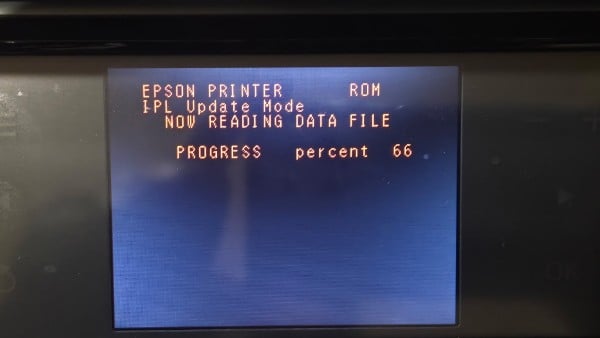
All good?
Side note, I think that this topic has the most people writing their first post here.
4 Likes
I had to start over. There is a method here to replace the new firmware upgrade file with the older version in the Firmware Updater Tool.
I followed those instructions and I’m at 69% progress so I am waiting patiently.
1 Like
It worked for me. Thank you! For some reason it would not complete the “rollback” firmware install at first and kept getting stuck at 69%. Finally, after the 6th try, the process completed to 100%. Thank you again. Just a bit of perseverance got it to complete.
4 Likes