# Epson Firmware Rollback--Instructions and Files
**URL:** https://jtechforums.org/t/epson-firmware-rollback-instructions-and-files/713
**Category:** Software & tools
**Created:** [January 25, 2025, 2:12pm UTC](https://jtechforums.org/t/epson-firmware-rollback-instructions-and-files/713 "2025-01-25T14:12:01Z")
**Posts on this page:** 20
**Page:** 1
### Author:  [@FlipAdmin](https://jtechforums.org/u/FlipAdmin)
#### Post date: [January 25, 2025, 2:12pm UTC](https://jtechforums.org/t/epson-firmware-rollback-instructions-and-files/713/1 "2025-01-25T14:12:01Z")
If you have had an Epson printer, perhaps you have followed some of the drama over Epson firmware updates that prevent using cheaper third-party ink cartridges. I’m starting this thread to document how to do firmware rollbacks, including information on how to acquire the old firmware, which isn’t always readily available on the internet anymore, because why would Epson maintain easy download pages for people who don’t want to pay the robber barons.
In my case, I have an Epson WF-4820 that I needed to roll back to an old firmware version. I’ve uploaded the firmware here to make sure that it is preserved for future generations.
[FWCJ06TL\_SH13LC.exe](https://jtechforums.org/uploads/short-url/hCh0e2Ln9Epnvsbi2TQPXq5H40X.exe) (36.7 MB)
There are various threads on reddit and other places recommending specific firmware versions for various Epson printers. Often, these firmware versions can no longer be downloaded directly from the Epson support site. A bit of digging, however, led me to figure that that they are all still on [https://ftp.epson.com/drivers/--insert](https://ftp.epson.com/drivers/--insert) firmware name here–
For example, the FWCJ06TL\_SH13LC.exe file is at [https://ftp.epson.com/drivers/FWCJ06TL\_SH13LC.exe](https://ftp.epson.com/drivers/FWCJ06TL_SH13LC.exe) I’m uploading it here just in case Epson removes it from their ftp site.
Here the firmware to roll back the WF-4830: [FWCJ05TL\_SG13LC.exe](https://jtechforums.org/uploads/short-url/zqCqnMiWWQQagA8i1LJFu1C1vk1.exe) (36.9 MB)
Here are install instructions, ripped shamelessly from a reddit thread:
> [@](#):
>
> The first thing you need to do to rollback your firmware is to hook-up your printer to your Windows PC with a traditional USB printer cable.
>
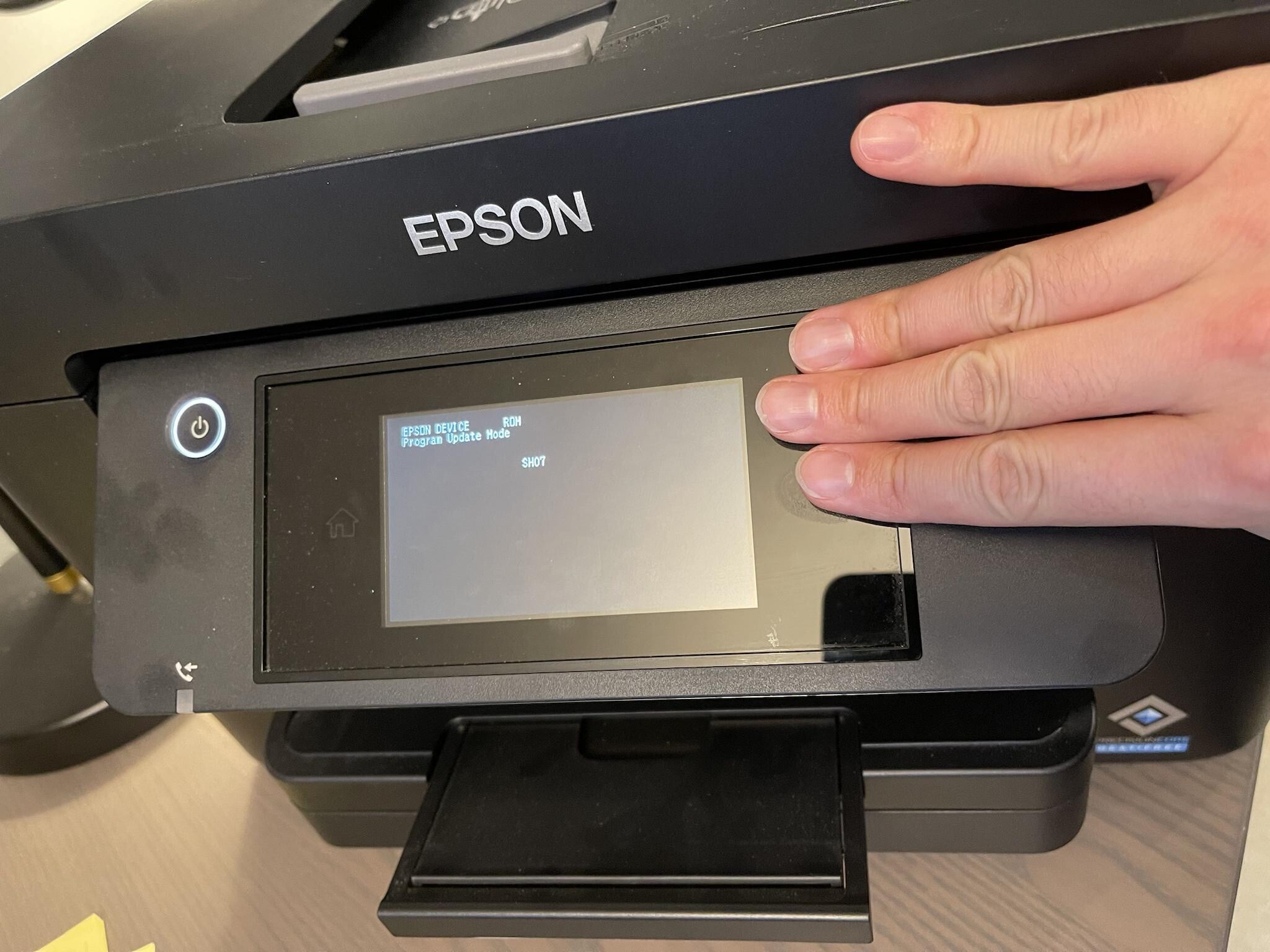
> Next you need to get the printer into recovery mode. With the new Workforce printers you’ll note that the only physical button is the power button. I discovered after some trial and error that the way to set the printer into recovery mode is as follows:
>
> Turn off the power by pressing the front power button.
>
> Use three fingers and cover as much of the top right black corner of the touchscreen as possible, including covering the ? button.
>
> Press the power button while still holding your fingers over the top right corner of the touchscreen
>
> 
>
> When the white power button light comes on you can release the power button and lift your three fingers from the touchscreen.
>
> Note this might take a dozen tries or so to do properly… Don’t give up, eventually you’ll get to the black recovery screen showing white text.
>
> The next thing to do is to find an old Firmware ‘.EXE’ file. If you’re lucky like I was, although Epson had pushed a new firmware update to my printer over wifi, their website still had a previous (1-year old) firmware available for download on their website.
>
> On this item, my advice is specific to WF-4820 owners. For the WF-4820 you can go to the following Epson website - [Epson WorkForce Pro WF-4820 | Support | Epson US](https://epson.com/Support/Printers/All-In-Ones/WorkForce-Series/Epson-WorkForce-Pro-WF-4820/s/SPT_C11CJ06201#drivers) and under the ‘Firmware +’ tab download the FWCJ06TL\_SH13LC.exe file. Other WF owners can try searching their respective models and hopefully you’ll find a previous version firmware still on the Epson website. If not, you’ll have to scour Google and I wish you the best of luck.
>
> Run the downloaded .EXE file while your printer is hooked up by USB and in recovery mode.
>
> Once the firmware software is done running, it will seem like nothing is happening to your printer for about 15 minutes, but let it sit for a while and eventually you’ll get a screen on the printer saying a ‘Program Update Mode FINISHED’ and all the lights will be flashing in unison on and off.
>
> At this point you can unplug your printer from the wall outlet, then plug it back in. Turn it on and it will then be back on the SH13LC firmware
---
### Author:  [@cdnred](https://jtechforums.org/u/cdnred)
#### Post date: [March 7, 2025, 3:11pm UTC](https://jtechforums.org/t/epson-firmware-rollback-instructions-and-files/713/2 "2025-03-07T15:11:29Z")
I tried the 3 finger reset but either it didn’t work for me or the power wouldn’t come on. Did Epson maybe put a bug in one of their updates to prevent using this 3 finger reset to work…? I had used the update perhaps 2-3 times since I’ve bought this WF-4820 two years ago. I’ve stopped updating the software after that…
---
### Author:  [@FlipAdmin](https://jtechforums.org/u/FlipAdmin)
#### Post date: [March 7, 2025, 3:13pm UTC](https://jtechforums.org/t/epson-firmware-rollback-instructions-and-files/713/3 "2025-03-07T15:13:27Z")
> [@cdnred](#):
>
> I tried the 3 finger reset but either it didn’t work for me or the power wouldn’t come on.
It can be tricky to get the 3 finger reset tight. I would try it a bunch more times.
---
### Author:  [@Alex\_Monteiro](https://jtechforums.org/u/Alex_Monteiro)
#### Post date: [June 13, 2025, 8:26pm UTC](https://jtechforums.org/t/epson-firmware-rollback-instructions-and-files/713/4 "2025-06-13T20:26:03Z")
Any idea where we can find the firmware version for Mac? Epson is sending everyone on a wild goose chase.
---
### Author:  [@Eddie\_Francisco\_Jr](https://jtechforums.org/u/Eddie_Francisco_Jr)
#### Post date: [September 2, 2025, 7:36am UTC](https://jtechforums.org/t/epson-firmware-rollback-instructions-and-files/713/5 "2025-09-02T07:36:48Z")
\*Press: [4]+ [7] + [Job / Status] + [POWER]
---
### Author:  [@rewaren](https://jtechforums.org/u/rewaren)
#### Post date: [September 9, 2025, 1:10am UTC](https://jtechforums.org/t/epson-firmware-rollback-instructions-and-files/713/6 "2025-09-09T01:10:39Z")
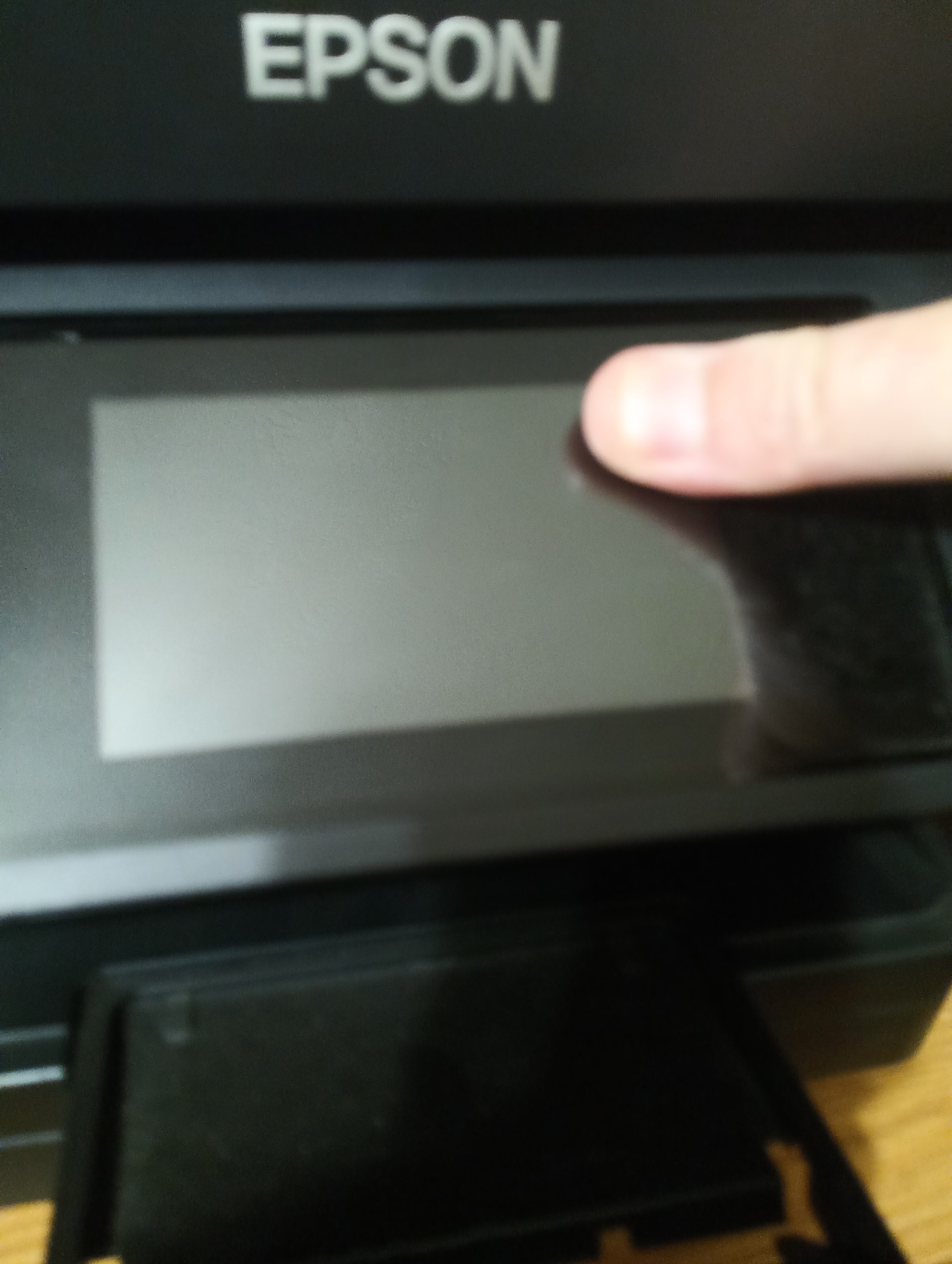
By putting my thumb here, I was successful 3 times in a row.
---
### Author:  [@Peter\_Wijgerse](https://jtechforums.org/u/Peter_Wijgerse)
#### Post date: [December 17, 2025, 11:30pm UTC](https://jtechforums.org/t/epson-firmware-rollback-instructions-and-files/713/7 "2025-12-17T23:30:19Z")
After the December update the thumb in the left corner of the blue part works, but… you have to hold it for like 25 seconds. You know you are right if the printer doesn’t startup when pressing the power button for 3 to 4 seconds, then just keep holding it, of it does start up in 4 secs it’ll go to the homescreen. Good luck you all
---
### Author:  [@xxBDigglerxx](https://jtechforums.org/u/xxBDigglerxx)
#### Post date: [December 18, 2025, 12:24am UTC](https://jtechforums.org/t/epson-firmware-rollback-instructions-and-files/713/8 "2025-12-18T00:24:11Z")
I heard elsewhere, that you just need to cover the “?” symbol in the black part of the screen. You can see it even when the printer is off if you look at an angle. This worked for me.
---
### Author:  [@roadshow](https://jtechforums.org/u/roadshow)
#### Post date: [February 21, 2026, 6:04pm UTC](https://jtechforums.org/t/epson-firmware-rollback-instructions-and-files/713/9 "2026-02-21T18:04:35Z")
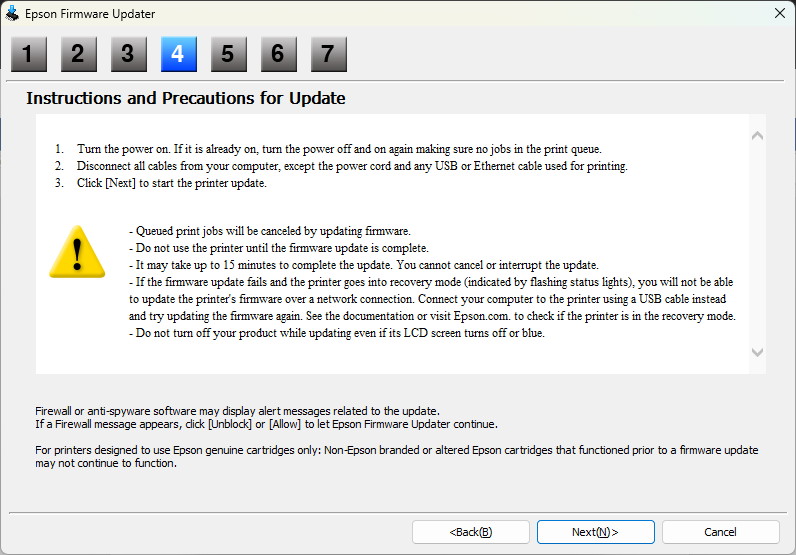
The solution by @rewaren worked for me to gain access, but unfortunately the update via USB kept failing. It would say it finished, but the status light would just flash which indicated failure and never restarted. Verified when I tried a restart via cord power cycle and the crappy update was still present.
Oh well…
---
### Author:  [@Tj\_Davis](https://jtechforums.org/u/Tj_Davis)
#### Post date: [April 25, 2026, 2:30am UTC](https://jtechforums.org/t/epson-firmware-rollback-instructions-and-files/713/10 "2026-04-25T02:30:16Z")
Literally just used this today. Not all heroes wear capes…🥲
Thank you for preserving the code. 💯
---
### Author:  [@PleaseSmileToday](https://jtechforums.org/u/PleaseSmileToday)
#### Post date: [April 26, 2026, 3:02am UTC](https://jtechforums.org/t/epson-firmware-rollback-instructions-and-files/713/11 "2026-04-26T03:02:31Z")
Welcome to Jtech!
If I may ask, did this come up as one of the first google results?
---
### Author:  [@Tj\_Davis](https://jtechforums.org/u/Tj_Davis)
#### Post date: [April 27, 2026, 3:32am UTC](https://jtechforums.org/t/epson-firmware-rollback-instructions-and-files/713/12 "2026-04-27T03:32:52Z")
It came up as ONE of the first results. So one of the top answers for asking about “finding the file” while on Google’s search engine; after explicitly typing the EXACT file name in. (got the exact name of the file from a reddit forum of a lady that went through the same issue with my exact workforce model)
Obviously the only the reason I even looked for the exact file was because Epson got rid of it off their archived download site. Thanks again!😊
---
### Author:  [@hatesepson](https://jtechforums.org/u/hatesepson)
#### Post date: [June 30, 2026, 8:04pm UTC](https://jtechforums.org/t/epson-firmware-rollback-instructions-and-files/713/13 "2026-06-30T20:04:54Z")
After many years of great printing on my Epson XP-355, it stopped offering me the option of conmtinuing to use third party ink cartridges - this has only happened in the last four weeks (month of June 2026). At last I have an understanding of what the issue is. Surely illegal by Epson to stop you from using something you purchased (printer) with no written agreement to only use their extortionate priced ink!? It would be like buying a car and having it stop working altogether because you put in the wrong brand of petrol.
I’m trying to locate old firmware for the Epson xp-355 - looks like being RJ1511 or RJ1018 and bypassing their illegal blocking of me using my own paid for printer. I really still can’t comprehend that they get away with doing it? Am I naive? Yes apparently. Any advice as I seem to have hit a brick wall. And are there any printer manufacturers that DO NOT utilise such sureptitious, underhand tactics. If I have to buy a new printer I won’t be buying Epson. But what can we buy and use whichever ink we please as company policy by thye printer manufacturer?
This is the best website I’ve found for info and explanation. Great that someone is saving old firmware that Epson would rather see die a death as they lose control of their illegal actions.
---
### Author:  [@ars18](https://jtechforums.org/u/ars18)
#### Post date: [June 30, 2026, 8:14pm UTC](https://jtechforums.org/t/epson-firmware-rollback-instructions-and-files/713/14 "2026-06-30T20:14:01Z")
I have two Epsons (et-5880) and I feel your pain, I refuse to update.
Let me try to see what I can find.
---
### Author:  [@ars18](https://jtechforums.org/u/ars18)
#### Post date: [June 30, 2026, 8:39pm UTC](https://jtechforums.org/t/epson-firmware-rollback-instructions-and-files/713/15 "2026-06-30T20:39:53Z")
> [@hatesepson](#):
>
> RJ1018
[https://download3.ebz.epson.net/dsc/f/03/00/14/07/35/c2e5a907e94944a8f4369187c57b80e5300901a4/FWH317TL\_RJ10I8\_s4.exe](https://download3.ebz.epson.net/dsc/f/03/00/14/07/35/c2e5a907e94944a8f4369187c57b80e5300901a4/FWH317TL_RJ10I8_s4.exe)
2018 I believe
Still looking, don’t know if that’s good or right
Ps. Found alot, will try to archive all.
---
### Author:  [@ars18](https://jtechforums.org/u/ars18)
#### Post date: [June 30, 2026, 9:33pm UTC](https://jtechforums.org/t/epson-firmware-rollback-instructions-and-files/713/16 "2026-06-30T21:33:16Z")
[@admins](https://jtechforums.org/groups/admins) if you want to be the authority on the Internet for Epson, please host my archive it’s too big 😄
---
### Author:  [@ars18](https://jtechforums.org/u/ars18)
#### Post date: [July 1, 2026, 1:37am UTC](https://jtechforums.org/t/epson-firmware-rollback-instructions-and-files/713/17 "2026-07-01T01:37:22Z")
> **[Epson Printer Firmware Archive (2026) : Free Download, Borrow, and Streaming...](https://archive.org/details/epson-printer-firmware-archive)**
>
> Epson inkjet printer firmware archive: current firmware for ~350 consumer models (Windows + macOS), PLUS older versions where still recoverable, preserving...
Let me know if you find something useful in there.
---
### Author:  [@hatesepson](https://jtechforums.org/u/hatesepson)
#### Post date: [July 1, 2026, 1:06pm UTC](https://jtechforums.org/t/epson-firmware-rollback-instructions-and-files/713/18 "2026-07-01T13:06:56Z")
Wow, that is quite an archive.
Will check out the 1st link you put up and see what happens when I try and install it via the cable link to the printer. It’s all new to me. Thanks for your help. I’ll let you know if it worked or not.
---
### Author:  [@hatesepson](https://jtechforums.org/u/hatesepson)
#### Post date: [July 1, 2026, 1:59pm UTC](https://jtechforums.org/t/epson-firmware-rollback-instructions-and-files/713/19 "2026-07-01T13:59:05Z")
Thanks ars18 - I used your RJ1018.exe firmware on my Epson XP-355 and worked a treat - now accepts third party ink cartridges as before. Have also disabled automatic updates.
After a few tries with combination of buttons on front of printer, the ROM dialogue box came up on the screen and I then installed the previously downloaded RJ1018.exe file. At first it wouldn’t accept ink cartridges, so I removed cartridges, switched printer off and reinstallled them and all now working fine - just as before - warns you that cartridges not genuine but allows you to continue. That option was remeoved with a recent automatic update. Anyway, learnt much this week. Well recommended. Thanks again - Genius!!
---
### Author:  [@ars18](https://jtechforums.org/u/ars18)
#### Post date: [July 1, 2026, 2:00pm UTC](https://jtechforums.org/t/epson-firmware-rollback-instructions-and-files/713/20 "2026-07-01T14:00:10Z")
Happy to hear! If you ever see anyone online looking for Epson firmware and for people who can help, point them here and to the archive 🙂
Credit owed for instructions to @FlipAdmin
I personally have never flashed an Epson printer (or any printer).
[Next page](https://jtechforums.org/t/epson-firmware-rollback-instructions-and-files/713.md?page=2)