# APK Editor for Windows?
**URL:** https://jtechforums.org/t/apk-editor-for-windows/4429
**Category:** Recommendations
**Tags:** Recommendations, APK, App, APK-Modding, Software
**Created:** [May 21, 2025, 4:58am UTC](https://jtechforums.org/t/apk-editor-for-windows/4429 "2025-05-21T04:58:24Z")
**Posts on this page:** 16
**Page:** 1
### Author:  [@kosherboy](https://jtechforums.org/u/kosherboy)
#### Post date: [May 21, 2025, 4:58am UTC](https://jtechforums.org/t/apk-editor-for-windows/4429/1 "2025-05-21T04:58:24Z")
What’s a good and safe APK editor for Windows?
---
### Author:  [@mufandchush](https://jtechforums.org/u/mufandchush)
#### Post date: [May 22, 2025, 2:50am UTC](https://jtechforums.org/t/apk-editor-for-windows/4429/2 "2025-05-22T02:50:53Z")
I use apk editor studio (I think its called that). It uses apktool so instead of having to run the command from cmd it does it for you. It also simplifies the editing after unpacking like instead of changing the package name from the file you can do it directly from the app. It also provides signing the app (I don’t know if that is through apktool or something else).
Safe? I dont know if your scared its less risky to use apktool directly.
---
### Author:  [@Darth](https://jtechforums.org/u/Darth)
#### Post date: [May 22, 2025, 10:52pm UTC](https://jtechforums.org/t/apk-editor-for-windows/4429/3 "2025-05-22T22:52:03Z")
[APK Easy Tool](https://xdaforums.com/t/closed-discontinued-windows-apk-easy-tool-v1-60-2022-06-23.3333960/)
---
### Author:  [@kosherboy](https://jtechforums.org/u/kosherboy)
#### Post date: [September 26, 2025, 12:55am UTC](https://jtechforums.org/t/apk-editor-for-windows/4429/4 "2025-09-26T00:55:38Z")
> [@mufandchush](#):
>
> I use apk editor studio
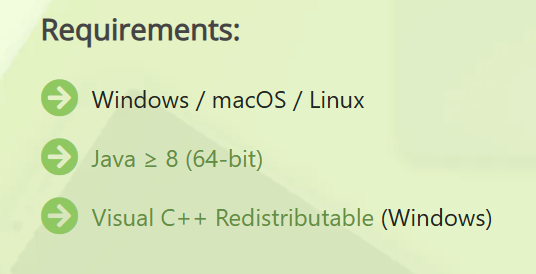
@mufandchush is this it? [APK Editor for PC and Mac – APK Editor Studio](https://qwertycube.com/apk-editor-studio)
What does this mean?
---
### Author:  [@Air\_Condition150](https://jtechforums.org/u/Air_Condition150)
#### Post date: [September 26, 2025, 1:11am UTC](https://jtechforums.org/t/apk-editor-for-windows/4429/5 "2025-09-26T01:11:20Z")
Yea I use this app too, best apk editor in the world. Your computer/laptop probably already has Visual C++ Redistributable. But I think you will need to install [Java](https://www.java.com/en/download/) if you don’t already have it installed
---
### Author:  [@kosherboy](https://jtechforums.org/u/kosherboy)
#### Post date: [September 26, 2025, 1:13am UTC](https://jtechforums.org/t/apk-editor-for-windows/4429/6 "2025-09-26T01:13:33Z")
> [@Air\_Condition150](#):
>
> install [Java](https://www.java.com/en/download/)
All I need to do is download that java exe and run it and I’m good? (I have no clue what in the world java is).
---
### Author:  [@Air\_Condition150](https://jtechforums.org/u/Air_Condition150)
#### Post date: [September 26, 2025, 1:16am UTC](https://jtechforums.org/t/apk-editor-for-windows/4429/7 "2025-09-26T01:16:09Z")
Yes you need to just install it. Java is a program language and this program is needed to run a lot of apps/programs that were built using java (not all of them) including this one. Can also be used to make java programs and apps
---
### Author:  [@kosherboy](https://jtechforums.org/u/kosherboy)
#### Post date: [September 26, 2025, 1:22am UTC](https://jtechforums.org/t/apk-editor-for-windows/4429/8 "2025-09-26T01:22:20Z")
> [@Air\_Condition150](#):
>
> Yea I use this app too, best apk editor in the world.
How can I do a simple package rename?
---
### Author:  [@ys770](https://jtechforums.org/u/ys770)
#### Post date: [September 26, 2025, 1:30am UTC](https://jtechforums.org/t/apk-editor-for-windows/4429/9 "2025-09-26T01:30:12Z")
Change it in the manifest
---
### Author:  [@Air\_Condition150](https://jtechforums.org/u/Air_Condition150)
#### Post date: [September 26, 2025, 1:34am UTC](https://jtechforums.org/t/apk-editor-for-windows/4429/10 "2025-09-26T01:34:02Z")
After you unpack the apk there will be a button that says “open contents” and then open “AndroidManifest.xml” from the main folder (best if opened with a coding app like visual studio code and not windows notepad) then you will see `“package=”com.android.cocacola.test”` (just a example) change that package name to whatever you want, some apks might not work anymore if you change the package name but most of them won’t cause problems. Don’t use spaces, symbols and emojis, only use dots (not 2 dots connected), ABC’s and numbers.

---
### Author:  [@mufandchush](https://jtechforums.org/u/mufandchush)
#### Post date: [September 26, 2025, 5:59pm UTC](https://jtechforums.org/t/apk-editor-for-windows/4429/11 "2025-09-26T17:59:58Z")
> [@ys770](#):
>
> Change it in the manifest
no straight in the app there is a option, Much easier…
---
### Author:  [@kosherboy](https://jtechforums.org/u/kosherboy)
#### Post date: [September 26, 2025, 6:11pm UTC](https://jtechforums.org/t/apk-editor-for-windows/4429/12 "2025-09-26T18:11:40Z")
I didn’t see that option. Could you explain where I can find it.
---
### Author:  [@mufandchush](https://jtechforums.org/u/mufandchush)
#### Post date: [September 26, 2025, 6:13pm UTC](https://jtechforums.org/t/apk-editor-for-windows/4429/13 "2025-09-26T18:13:02Z")
Its called clone apk
---
### Author:  [@kosherboy](https://jtechforums.org/u/kosherboy)
#### Post date: [September 28, 2025, 6:07pm UTC](https://jtechforums.org/t/apk-editor-for-windows/4429/14 "2025-09-28T18:07:28Z")
@mufandchush is there an option to lower the SDK?
I get this on ADB install `Failure [INSTALL_FAILED_OLDER_SDK]`.
---
### Author:  [@Air\_Condition150](https://jtechforums.org/u/Air_Condition150)
#### Post date: [September 28, 2025, 6:33pm UTC](https://jtechforums.org/t/apk-editor-for-windows/4429/15 "2025-09-28T18:33:46Z")
You can set it on the right side of apk editor but big chance it wont work
---
### Author:  [@kosherboy](https://jtechforums.org/u/kosherboy)
#### Post date: [September 28, 2025, 6:47pm UTC](https://jtechforums.org/t/apk-editor-for-windows/4429/16 "2025-09-28T18:47:44Z")
Which option?